Long-Tail Keyword Research for Beginners in 2026: Simple 7-Step Method to Find Easy Keywords

Long-Tail Keyword Research for Beginners

If you want to grow a blog in 2025, nothing is more important than mastering Long-Tail Keyword Research for Beginners. Today’s Google search environment has become more competitive, more AI-driven, and more focused on user intent—but the good news is that long-tail keywords still offer the fastest and easiest way for new bloggers to rank.

Long-tail keywords are longer, more specific search phrases people use when they want a clear answer, solution, or product. Since fewer websites target these terms, beginners have a much higher chance of ranking quickly. This is why Long-Tail Keyword Research for Beginners continues to be the most effective strategy for new bloggers and small websites in 2025.

Whether your blog is brand new or you’re trying to grow your existing content, mastering long-tail keywords will help you get traffic, earn authority, and create content Google wants to rank. This guide will show you exactly how to use long-tail keywords step-by-step, using a simple 7-step method designed for keyword research for beginners.


Why Long-Tail Keyword Research for Beginners Matters Most in 2025

Long-tail keyword research for beginners matters more than ever in 2025 because Google’s AI systems now focus heavily on intent, clarity, and topic depth—not just keyword volume. Short, broad keywords are dominated by high-authority websites, making it almost impossible for new bloggers to compete. But long-tail keywords open the door to fast rankings because they match specific user questions, have lower competition, and allow beginners to create more helpful, targeted content. When you understand how to connect long-tail keywords with search intent, you start ranking faster, driving better-quality traffic, and building authority even with a new blog. That’s why mastering Long-Tail Keyword Research for Beginners is one of the smartest SEO strategies in 2025.

Search patterns are changing. With Google SGE, AI Overviews, and smarter ranking systems, Google now evaluates:

✔ Search intent
✔ Content depth
✔ Relevance
✔ Context
✔ User satisfaction

This shift has made broad keywords harder to rank for, especially for new sites. But long-tail keywords remain a major opportunity because:

  • They have lower competition
  • They capture specific search intent
  • They convert better
  • They are easier to rank
  • They attract the right audience

As a result, long-tail keyword research 2025 has become the foundation of modern SEO strategy.

Google loves precise, helpful answers. Long-tail keywords help you deliver exactly that.

Google’s AI search is changing everything, and learning how to rank in SGE is now essential for modern bloggers. SGE prefers structured, helpful, human-first content—especially when it answers user questions clearly. To understand which strategies actually work for SGE visibility, you can read our updated ranking guide here.

Long-Tail Keyword Research for Beginners

What Are Long-Tail Keywords? (Simple Explanation)

Long-tail keywords are longer search phrases, usually 3–6 words, that describe exactly what the user wants.

Examples:

❌ “SEO tools” (very hard to rank)
✔ “free SEO tools for starting blogging” (easy to rank)

❌ “blog ideas”
✔ “low competition blog ideas for students.”

These long descriptive keywords help Google understand your content clearly—and help your blog stand out.

This is why Long-Tail Keyword Research for Beginners works even for brand-new blogs with zero authority.


The Power of Search Intent in Long-Tail Research

If you want to do successful keyword research, you must understand long-tail & search intent keywords. Search intent means why the user is searching.

Four main types:

  1. Informational – “How to find long-tail keyword ideas.”
  2. Navigational – “YouTube Studio logi.n”
  3. Commercial – “best AI SEO tools 2025.”
  4. Transactional – “Buy a domain cheaply in India.”

Long-tail keywords almost always match one clear intent—this is why Google ranks them easily.

When writing content, your job is to match that intent perfectly.


7-Step Long-Tail Keyword Research Method (Beginner Friendly)

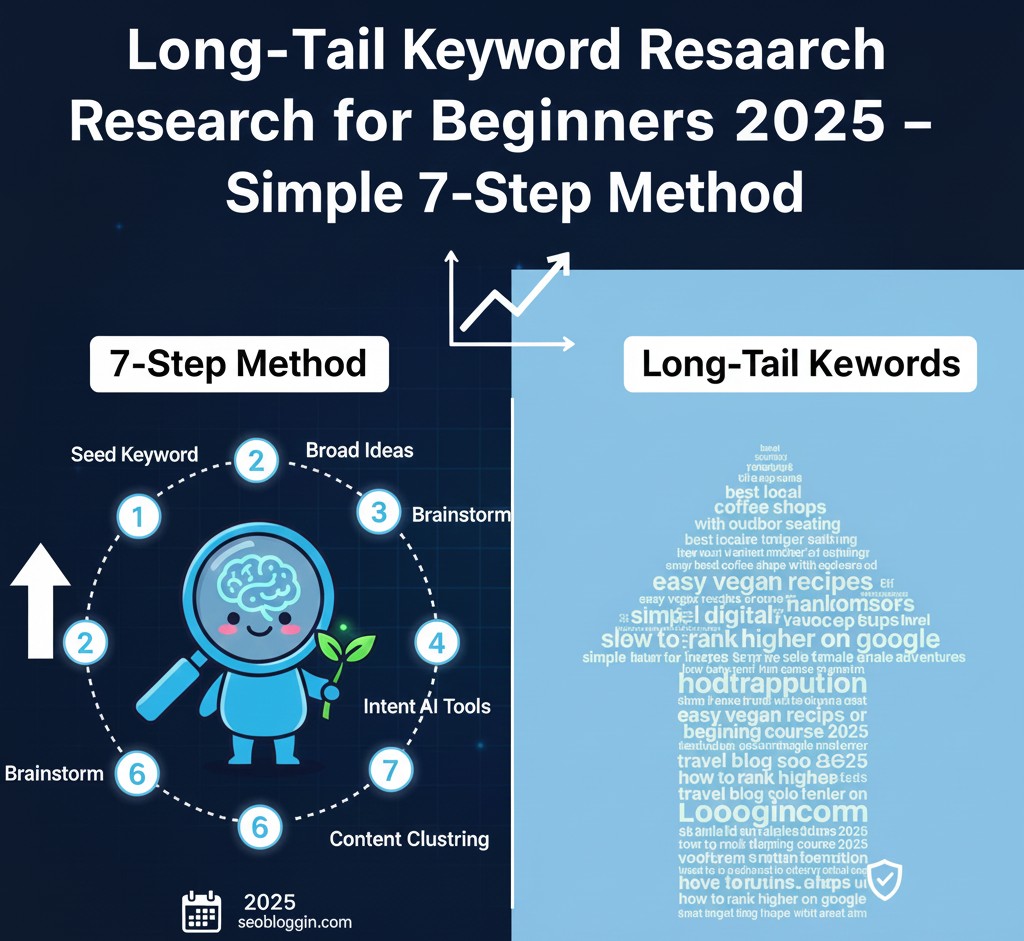
A simple, beginner-friendly long-tail keyword research method begins with selecting a niche topic you understand. Step 1: Start with a broad seed keyword. Step 2: Use tools like Google Autocomplete, AnswerThePublic, or free keyword tools to extract suggestions. Step 3: Identify question-based phrases because they show strong search intent. Step 4: Compare difficulty and competition using free SEO tools. Step 5: Group related keywords into clusters to build strong topic relevance. Step 6: Choose low competition long-tail keywords that match your content goals. Step 7: Create articles that directly answer user intent with clarity and depth. This structured approach ensures your content aligns perfectly with search demand and ranks higher, even with a new website.

This method is designed specifically for Long-Tail Keyword Research for Beginners, keeping things simple, powerful, and effective.


Step 1: Start With a Broad Topic

Begin with a simple topic relevant to your blog.

For example:

  • Blogging
  • Fitness
  • Cooking
  • AI tools
  • Finance
  • Education
  • Technology

These broad topics help you generate an initial list of ideas. This step is essential in keyword research for beginners.


Step 2: Use Google Auto-Suggest (Free & Powerful)

Type your main topic into Google and notice the suggestions:

📌 Example: “blogging tips for…”

Google will show:

  • blogging tips for beginners
  • blogging tips for students
  • blogging tips for low competition niches

Each of these is a low competition long-tail keyword.

Google suggestions come from real user searches—so they are extremely valuable.


Step 3: Explore the ‘People Also Ask’ Box

Google’s “People Also Ask” box is an unlimited goldmine of ideas.

Search:
“long-tail keyword research 2025”

You will find questions like:

  • Find long-tail keywords?
  • How do beginners do keyword research?
  • Why are long-tail keywords important in 2025?

Each question can become an article topic.

This is one of the simplest easy keyword research method steps for beginners.


Step 4: Use Competitor Websites to Steal Easy Keywords

Check small websites in your niche—not big authority sites.

Search:
“site:yourcompetitor.com keyword”

Find their article structure, headings, FAQs, and topics.

Look for:

✔ keywords they didn’t cover
✔ weak content gaps
✔ outdated information
✔ missing long-tail variations

These turn into low competition long-tail keywords instantly.


If your impressions are stuck at zero, learning how to rank Web Stories is the fastest way to increase visibility and appear in Google Discover. Most creators miss simple optimization techniques—like keyword placement, image quality, and story sequencing. To understand the exact methods that boost Web Stories ranking in 2025, you can check out this step-by-step guide here.

Bloggers in 2025 are using an AI SEO blog writer to save time, research faster, and maintain a consistent posting schedule. But not all tools produce search-friendly content. If you want a detailed list of the best AI writers for SEO-packed blogging, explore our expert-tested recommendations here.

Step 5: Use AI Tools to Expand Keywords

AI tools like Google Gemini and ChatGPT can generate long-tail keyword ideas based on your niche.

Example prompt:

“Give me 30 long-tail & search intent keywords for beginners in the blogging niche.”

This will instantly give you:

  • long-tail keyword ideas
  • user intent phrases
  • question-based keywords
  • actionable content ideas

AI makes Long-Tail Keyword Research for Beginners 10× faster and 10× easier.


Step 6: Validate Keywords Before Using Them

Not every keyword is worth targeting.

Check three things:

✔ 1. Search Intent Accuracy

Does the keyword match your article idea?

✔ 2. Competition Level

Lower competition = faster ranking.

✔ 3. Monetization

Does the keyword bring a profitable audience?

These filters ensure you pick the right long-tail keyword research 2025 topics.


Step 7: Build Topic Clusters (Most Important)

To rank in 2025, you need topical authority.

Pick one main keyword and build supporting articles around it.

Example cluster:

🔵 Main Keyword: Long-Tail Keyword Research for Beginners

  • how to find long-tail keywords
  • easy keyword research method
  • long-tail & search intent keywords explained
  • low competition long-tail keywords for small blogs

Clusters help Google understand your expertise—and boost rankings faster.


Why Long-Tail Keyword Research Is Perfect for Beginners

Long-tail keyword research is ideal for beginners because it removes the pressure of competing with huge authority websites. Instead of targeting broad, competitive terms, beginners can focus on low competition long-tail keywords that match what real users search daily. These keywords have clearer intent, easier ranking potential, and often lead to higher click-through rates because they answer specific problems. For anyone starting SEO in 2025, using long-tail keyword research techniques is the smartest strategy — you get faster visibility, more targeted readers, and stronger chances of ranking multiple pages without needing high domain authority. This approach is not only simple but also the most reliable foundation for long-term blogging success.

Here’s why beginners must focus on long-tail keywords in 2025:

✔ Faster rankings for new blogs
✔ Lower competition than broad keywords
✔ Higher click-through rates
✔ More targeted traffic
✔ Higher earnings per visitor
✔ Easier content planning

If you are serious about growing your blog, Long-Tail Keyword Research for Beginners should be your No.1 priority.

If you want to discover smarter content ideas with less effort, learning how to use Gemini keywords effectively can transform your SEO workflow. Gemini helps you uncover hidden long-tail topics and user-intent phrases that traditional tools often miss. For a deeper breakdown on how Gemini can speed up keyword research and help you pick high-ranking topics, you can explore our complete guide here.

Long-Tail Keyword Research for Beginners

After the Rank Math Update November 2025, Google-focused optimization has become easier—but only if you know how to configure the new features correctly. Many bloggers are still missing important ranking boosts simply because they aren’t using the update’s AI recommendations. If you want to understand every update and apply the best settings for faster ranking, you can check out our complete tutorial here.


How to Find Long-Tail Keywords Easily (Beginner Hacks)

Finding long-tail keywords doesn’t have to feel complicated—especially when you follow a few simple beginner-friendly hacks that work in 2025. Start by typing your main topic into Google and checking the People Also Ask section, because it reveals real user questions that have low competition and high ranking chances. Next, use AI tools like Gemini or ChatGPT to generate dozens of long-tail & search intent keywords based on your niche—this gives you keyword variations you might never discover manually. You can also check autocomplete suggestions, related searches, and trending queries to identify low competition long-tail keywords that new websites can rank for easily. When you combine these methods, long-tail keyword research for beginners becomes simple, fast, and highly accurate.

Here are simple tricks anyone can use:

✔ Use question-based keywords

Because they convert extremely well.

✔ Check Reddit discussions

People ask real problems → perfect keyword ideas.

✔ Look at YouTube comments

Users share exact pain points.

Especially if you write about lifestyle, fitness, beauty, food, or home niches.

To find trending long-tail keywords in seconds.

These methods are powerful additions to your easy keyword research method.


Example List of Low Competition Long-Tail Keywords

Low-competition long-tail keywords usually come from niche-specific questions, problem-solving phrases, or beginner-level topics that big websites rarely cover. For example, instead of targeting a general term like “blogging tips,” switch to highly specific phrases such as “blogging tips for beginners in 2025,” “how to do keyword research without paid tools,” or “best long-tail keywords for new blogs.”
These keywords attract smaller but far more targeted traffic—people who are ready to read, learn, and convert. When you build your content strategy around 0 competition or low-competition long-tail keywords, ranking becomes 10x easier, even for new websites. Add these keywords naturally into headings, intro paragraphs, and FAQs to increase relevance and visibility.

Here are some easy ideas you can target:

  • how to start a blog with low investment 2025
  • AI tools for keyword research beginners
  • low competition niche ideas for students
  • easy fitness routines for beginners
  • best self-care habits for busy people

These long-tail keywords are almost guaranteed to bring traffic.


Common Mistakes Beginners Must Avoid

Avoid these mistakes if you want success:

❌ Choosing broad keywords
❌ Ignoring user intent
❌ Copying competitor keywords blindly
❌ Over-optimizing headings
❌ Not using long-tail & search intent keywords
❌ Not building topic clusters
❌ Writing articles without keyword mapping

Following this guide helps avoid all these mistakes.


Conclusion

Mastering Long-Tail Keyword Research for Beginners is the smartest way to grow your blog in 2025. Long-tail keywords allow you to rank faster, drive highly targeted traffic, and build authority—even if your website is new.

By using the simple 7-step method, beginners can find:

✔ low competition long-tail keywords
✔ accurate search intent phrases
✔ profitable content ideas
✔ long-tail keyword research 2025 opportunities
✔ easy keyword research method techniques

If you stay consistent and keep creating helpful content, you will see major improvements in ranking, traffic, and earnings.

FAQ’s

Q1. What is the easiest way for beginners to start keyword research in 2025?

ANS- The easiest method for beginners is to focus on long-tail keywords using simple AI-assisted tools. These keywords have clear intent, lower competition, and faster ranking potential. With just a few prompts and basic filtering, beginners can build a list of keywords that match their niche and are easy to write content around.

Q2. How can AI tools help me find low-competition keywords faster?

ANS- AI tools scan search patterns, related queries, and user intent instantly—saving hours of manual research. They highlight keyword difficulty, trending opportunities, and unexplored areas within your niche. This makes it easier to find keywords your competitors have overlooked.

Q3. Are long-tail keywords still effective in 2025?

ANS- Yes, long-tail keywords are more effective than ever because Google’s AI systems now prioritize intent and specificity. Long-tail phrases match precise user needs, making it easier for new blogs to rank faster with less competition.

Q4. How many keywords should I target in one article?

ANS- Ideally, one primary keyword and 3–5 LSI keywords. This keeps your article focused while giving Google enough context to understand your topic deeply. Avoid stuffing—use keywords naturally within headings, intros, CTAs, and conclusions.

Q5. How do I know if a keyword can rank fast on Google?

ANS- Quick-ranking keywords usually have: low competition, narrow user intent, smaller websites already ranking, and a clear topic structure. If the top results come from newer blogs or general sites, it’s a strong sign the keyword is easy to rank for.


Best AI SEO Tools for Bloggers on a Budget (Free & Paid Tools 2026 Guide)

Best AI SEO Tools for Bloggers on a Budget in 2025 – Free and Paid Tools Guide

If you want to grow your blog in 2025 without spending a lot of money, choosing the Best AI SEO Tools for Bloggers becomes essential. The blogging world has become more competitive, search intent has become more complex, and Google’s AI-based ranking systems now reward content that is well-optimized, accurate, and deeply helpful. This is where AI tools give bloggers a major advantage—especially when you’re working with a limited budget.

Today, AI tools can perform keyword research, generate outlines, optimize content, improve on-page SEO, and even analyze competitors—tasks that previously required expensive subscriptions or agency support. Whether you’re brand new and looking for AI SEO tools for beginners, or you’re a growing blogger searching for budget-friendly SEO tools, 2025 offers a powerful set of solutions designed for fast, effective, and affordable optimization.

This guide will walk you through the top Best AI SEO Tools for Bloggers, including free tools, low-cost tools, and must-have AI assistants that deliver maximum value without draining your wallet.


⭐ Why Bloggers Need AI SEO Tools for Bloggers in 2025

In 2025, Google’s algorithms will use AI to understand:

  • Search intent
  • Topic relevance
  • Content structure
  • Semantic meaning
  • User experience signals

Because of this, bloggers must produce content that is not only informative but also technically optimized. The Best AI SEO Tools for Bloggers help bridge this gap by automating:

  • Keyword discovery
  • Content briefs
  • On-page SEO corrections
  • NLP keyword suggestions
  • Readability improvements
  • Competitor insights

Even AI SEO tools for beginners now offer advanced features that used to be premium-only. This makes 2025 the best time to use budget-friendly SEO tools to grow your blog smartly and sustainably.

If you want to discover hidden opportunities and low-competition topics, exploring gemini keywords can completely change the way you plan content. Google Gemini understands search intent far better than traditional tools, and using the right Gemini Keywords helps you target phrases your competitors often miss. This is the smartest shortcut to faster rankings in 2025.

Best AI SEO Tools for Bloggers on a Budget in 2025 – Free and Paid Tools Guide

⭐ 1. Google Gemini – Best Free AI Tool for Keyword Research & Content Ideas

Google Gemini is currently one of the strongest Free AI SEO tools 2025, giving bloggers accurate keyword suggestions based on updated search patterns. Bloggers use it to:

  • Discover low-competition keywords
  • Generate topic clusters
  • Analyze search intent
  • Draft content outlines
  • Optimize headline variations

For bloggers who want to maximize efficiency without spending money, Gemini delivers insights quickly and acts as one of the Best AI tools for SEO writing because it understands search intent better than traditional keyword tools.

LSI Use: Free AI SEO tools 2025, Best AI tools for SEO writing, AI SEO tools for beginners


⭐ 2. ChatGPT – Best AI Writing Assistant for Bloggers on a Budget

ChatGPT has become one of the most reliable writing tools for bloggers who want quality content without spending too much. It helps beginners turn rough ideas into polished blog posts, create outlines, rewrite paragraphs, and generate long-tail keyword variations that actually rank. What makes ChatGPT the best AI writing assistant for bloggers on a budget is its ability to adapt to your writing style and produce content that feels natural, conversational, and SEO-friendly. Whether you’re crafting product reviews, listicles, or in-depth guides, ChatGPT saves hours of manual work and helps you publish consistently—something Google values highly in 2025. For bloggers who want professional-level writing support without investing in expensive tools, ChatGPT remains a powerful and affordable choice.

ChatGPT remains one of the Best AI SEO Tools for Bloggers because it helps with:

  • SEO-friendly paragraphs
  • Title and meta description ideas
  • FAQ generation
  • Schema-ready content
  • Editing and tone improvements

When used correctly, it becomes one of the most affordable SEO tools for bloggers, allowing them to produce high-quality content without hiring expensive writers.

LSI Use: Affordable SEO tools for bloggers, Best AI tools for SEO writing


⭐ 3. Rank Math Content AI – Smart Optimization for WordPress Bloggers

Rank Math Content AI has become a must-have tool for bloggers in 2025 because it removes guesswork from SEO and shows exactly what Google wants to see in your content. Instead of manually checking keyword density, readability, or relevance, Content AI analyzes top-ranking pages and gives you a clear list of keywords, questions, and NLP terms to include. This makes it incredibly beginner-friendly — especially if you struggle with on-page optimization. With Rank Math Content AI, you can build SEO-optimized outlines, improve content score quickly, and avoid common mistakes that hurt rankings. Whether you’re writing blog posts, listicles, reviews, or tutorials, this tool helps you optimize smarter and faster, ensuring your articles stand out in Google Search results.

If you’re a WordPress blogger, Rank Math Content AI is a must-have tool. It gives:

  • Keyword density suggestions
  • NLP keyword recommendations
  • Readability improvements
  • Link suggestions
  • Competitor analysis

What makes it one of the budget-friendly SEO tools is its ability to provide accurate optimization scores even for beginners. The tool ensures your article follows Google’s best practices—making it one of the AI SEO tools for beginners that improves ranking instantly.

LSI Use: AI SEO tools for beginners, Budget-friendly SEO tools

Best AI SEO Tools for Bloggers on a Budget in 2025 – Free and Paid Tools Guide

If you want to stay ahead of Google changes, make sure you understand the latest Rank Math update november 2025, which introduces new AI-powered scoring and optimization rules. With the Rank Math update November 2025, bloggers can fine-tune content accuracy, keyword usage, and readability to match Google’s new ranking systems—giving you a significant SEO advantage.


⭐ 4. Ubersuggest – Best Low-Cost Keyword Research Tool

Ubersuggest offers competitive keyword data at a fraction of the price compared to expensive SEO platforms. This makes it a strong option for bloggers who want the Best AI SEO Tools for Bloggers without spending heavily.

It helps you find:

  • Long-tail keywords
  • Keyword difficulty insights
  • SEO trends
  • Backlink data

Its low monthly pricing makes it one of the most affordable SEO tools for bloggers.


⭐ 5. Surfer SEO – AI-Powered Content Optimization

ChatGPT has quickly become the preferred writing partner for bloggers who want powerful AI assistance without spending a lot. It transforms simple ideas into well-structured blog posts, outlines, headlines, and even long-tail keyword variations in just seconds. For beginners and budget-conscious creators, ChatGPT is especially valuable because it boosts creativity, saves hours of writing time, and helps maintain consistent quality in every post. Since it understands search intent, the content it generates aligns closely with what both readers and Google look for in 2025. And when you combine ChatGPT’s AI suggestions with your personal experience and editing style, it becomes a dependable tool that helps you publish more.

Surfer SEO scans top-ranking content and shows exactly how to structure your article. Its AI system recommends:

  • Word count
  • Heading structure
  • NLP keywords
  • Internal linking
  • Content grade improvements

Although Surfer is a paid tool, its results make it one of the Best AI tools for SEO writing, especially for bloggers aiming for premium optimization standards.

Best AI SEO Tools for Bloggers on a Budget in 2025 – Free and Paid Tools Guide

For bloggers who want to speed up content creation without losing quality, using an seo ai writer can make a huge difference. A good seo ai writer helps you generate outlines, improve readability, optimize keyword placement, and create content that aligns with Google’s 2025 AI ranking guidelines. It’s perfect for beginners and professionals aiming for higher search visibility.


⭐ 6. Canva AI – Best Visual Tool for Bloggers Using Web Stories & Images

Visual ranking matters more in 2025 than ever before. Canva AI helps bloggers create:

  • Thumbnail images
  • Web Stories
  • Illustrations
  • Infographics
  • Featured images

Because Canva’s AI system automates design elements, it becomes one of the top budget-friendly SEO tools for bloggers who want visually appealing content.


⭐ 7. AnswerThePublic – Best Tool for Real User-Question Keywords

AnswerThePublic is one of the best tools for discovering real questions that users type into Google. It visualizes search intent through “who,” “what,” “why,” “where,” and “how” keywords—making it perfect for bloggers who want to build helpful, search-focused content. Every question it reveals is an opportunity to create a blog post, FAQ, subheading, or Web Story that answers real user needs. Beginners benefit the most because these question-based keywords usually have lower competition and higher engagement. If you want your blog to be seen as valuable and user-focused, AnswerThePublic is an essential part of your keyword research workflow.

If you’re writing blog posts targeting FAQs, user questions, or search-intent-based content, AnswerThePublic is essential. It helps bloggers discover:

  • Trending questions
  • User-generated keyword phrases
  • Long-tail search variations

This makes it valuable for those using AI SEO tools for beginners to develop their content plan.


⭐ 8. Google Trends + Search Console Insights – Hidden SEO Goldmines

Google’s own free tools offer massive value for keyword research and blog growth. Together, they help you understand:

  • Topic popularity
  • Seasonal search patterns
  • High-CTR pages
  • Best-performing content sections

For bloggers looking for Free AI SEO tools in 2025, these two tools are unbeatable.

Best AI SEO Tools for Bloggers on a Budget in 2025 – Free and Paid Tools Guide

If you’re struggling to increase impressions or clicks, learning how to rank web stories can instantly improve your visibility in Google Discover. Understanding how to rank web stories allows you to optimize titles, visuals, frames, and keywords in a way that matches Google’s mobile-first algorithm—leading to faster traffic growth.


⭐ Step-by-Step: How Bloggers Should Use AI SEO Tools for Bloggers on a Budget

Here is a simple workflow using the Best AI SEO Tools for Bloggers:

Step 1 — Start with Gemini for Keyword Discovery

Find long-tail and low competition keywords.

Step 2 — Use ChatGPT for Outlines & Content Drafting

Generate structured, SEO-friendly content foundations.

Step 3 — Optimize in Rank Math Content AI

Fix keyword density, readability, and meta tags.

Step 4 — Use Canva AI for Visual Enhancements

Create strong featured images and Web Stories.

Step 5 — Track Performance in Search Console

Refine your strategy based on impressions, clicks, and ranking pages.

This workflow is ideal for users seeking budget-friendly SEO tools that deliver high SEO value.

If you want maximum visibility in Google’s AI results, you must understand how to rank in SGE, because Google now prioritizes content that provides direct, actionable, and highly accurate answers. Learning how to rank in SGE helps you shape your posts around intent, clarity, and AI-aligned formatting—dramatically improving your chances of appearing in AI snapshots.


⭐ Why AI Tools Help You Rank Faster (2025 Insight)

AI reduces guesswork. Instead of manually analyzing search results, AI gives bloggers:

  • Faster keyword insights
  • Better content alignment
  • Optimized structure suggestions
  • Smarter competitor analysis

That’s why using the Best AI SEO Tools for Bloggers is now the fastest and most reliable way to grow organically—especially when you’re working with limited resources.


⭐ Common Mistakes Bloggers Must Avoid in 2025

Many beginners make the mistake of chasing high-competition keywords, publishing thin content, or relying entirely on AI without adding personalization. Another major mistake is ignoring long-tail keywords, which are easier to rank and bring more qualified traffic. Bloggers also often skip essential SEO steps such as internal linking, content optimization, and regular updates. Overusing AI tools without human editing can make content feel robotic, reducing engagement and search visibility. In 2025, success comes from combining smart keyword research, strong topical authority, and a balanced use of AI — not shortcuts.

To get the best results, avoid:

❌ Targeting high-difficulty keywords
❌ Relying only on AI-generated text without editing
❌ Ignoring internal linking
❌ Publishing without optimization
❌ Using too many tools without a strategy
❌ Neglecting user intent

Fixing these mistakes ensures your AI tools deliver maximum ranking value.

To create high-quality posts consistently, many creators now use an ai seo blog writer, which helps transform ideas into polished, SEO-optimized articles. An ai seo blog writer gives you better keyword suggestions, clearer structure, and stronger readability—all essential for ranking in Google’s AI-powered search results in 2025.


⭐ Conclusion

In 2025, blogging success depends on using smart tools—not expensive ones. The Best AI SEO Tools for Bloggers allow you to conduct keyword research, optimize content, improve structure, create visuals, and track performance without costly subscriptions.

Whether you rely on AI SEO tools for beginners, explore Free AI SEO tools 2025, or choose a few affordable SEO tools for bloggers, the key is consistency and strategic usage. With the right AI setup, even new bloggers can outrank established competitors.

AI is no longer optional—it’s the most powerful ally for bloggers who want to grow efficiently and stay ahead in 2025.

FAQ’S

Q1. Which are the Best AI SEO Tools for Bloggers on a Budget in 2025?

ANS- The Best AI SEO Tools for Bloggers on a Budget in 2025 include a mix of free and affordable tools like Google Gemini, Rank Math Content AI, Ubersuggest, Surfer AI, and WriterZen. These tools help beginners with keyword research, content optimization, SEO writing, and ranking insights without requiring expensive subscriptions.

Q2. Are there Free AI SEO Tools in 2025 that actually work?

ANS- Yes, several Free AI SEO Tools 2025 offer powerful features for bloggers. Google Keyword Planner, Google Gemini free tier, AnswerThePublic, and Rank Math free version all provide high-value keyword insights and optimization help. These free tools are great for beginners who want to grow their blogs without spending money.

Q3. Which AI SEO tool is best for absolute beginners?

ANS- For new bloggers, the best AI SEO tools for beginners are Rank Math Content AI, Google Gemini prompts, and Ubersuggest. These tools simplify SEO by generating keywords, optimizing content, and guiding you through on-page improvements with easy-to-follow suggestions.

Q4. Can affordable AI tools really help my blog rank faster?

ANS- Absolutely! Many affordable SEO tools for bloggers use AI to analyze search intent, find low-competition keywords, and optimize your content layout. With consistent use, these tools help improve your ranking speed and content quality without requiring expensive software.

Q5. What is the best AI tool for SEO writing in 2025?

ANS- The top AI tools for SEO writing in 2025 include ChatGPT, Gemini Advanced, Surfer AI, and Jasper. These tools help structure your articles, enhance readability, and insert relevant keywords naturally, making it easier for bloggers to create high-ranking content.

Rank Math AI SEO vs Yoast SEO 2026: Which Is Best for Bloggers?

Rank Math AI SEO vs Yoast SEO comparison for bloggers 2025

SEO plugins are the backbone of every successful WordPress blog, and in 2025, the competition between Rank Math AI SEO vs Yoast SEO has reached a whole new level. With Google’s AI-driven updates, bloggers now need smarter optimization tools, AI-powered insights, and deeper content analysis to stay visible in search results. Both plugins have evolved, but the real question is simple: Which SEO plugin actually helps bloggers rank faster in 2025?

This guide offers an honest, fresh, and practical comparison so you can choose the best plugin for your website’s growth.


⭐ Why Bloggers Are Shifting to AI-Powered SEO in 2025

The SEO landscape has transformed. Google now evaluates:

✔ AI content & human-edited structure
✔ Semantic keywords
✔ Search intent depth
✔ Author expertise
✔ Topical authority

This sudden shift created the need for powerful tools that can read, understand, and optimize content using AI. That’s exactly why the debate around Rank Math AI SEO vs Yoast SEO is at its peak. (Main Keyword — 2/9)

Rank Math introduced advanced Rank Math SEO features AI SEO 2025 features such as keyword scoring, AI content suggestions, schema recommendation, and competitor keyword analysis. Meanwhile, Yoast SEO update 2025 focuses on simplified optimization and readability analysis.

But which one actually helps you rank?


⭐ User Experience: Which Plugin Feels Easier in 2025?

✔ Rank Math:

The interface is clean, modern, and extremely beginner-friendly.
It guides bloggers with AI suggestions, automatic schema, instant keyword scoring, and smart linking features.

✔ Yoast SEO Update 2025:

Still great for beginners, but the design feels slightly outdated.
Yoast focuses more on content readability and “traffic light” scoring.

Winner: Rank Math SEO features
Why? Because bloggers prefer tools that tell them exactly how to improve SEO — not just highlight problems.

(LSI Used: Best SEO plugin for bloggers)


⭐ SEO Features Comparison

🔥 Rank Math SEO Features

Rank Math provides:

✔ AI keyword suggestions
✔ Schema templates
✔ Rank tracking
✔ Google Indexing API
✔ Local SEO
✔ Image SEO automation
✔ Internal link suggestions
✔ Advanced redirects

These Rank Math SEO features give bloggers complete control while saving hours of optimization time.

🔥 Yoast SEO Update 2025 Features

Yoast offers:

✔ Readability checking
✔ Simple keyword optimization
✔ Cornerstone content
✔ Basic schema
✔ Breadcrumb control

Useful features, but not as data-driven or AI-enhanced as Rank Math SEO features.

Winner: Rank Math — because of its AI engine and depth.

(LSI Used: Yoast SEO vs Rank Math comparison)


⭐ Content Optimization: AI vs Traditional SEO

Content optimization in 2025 has become a blend of AI-driven insights and traditional SEO fundamentals. AI tools help you analyze search intent, generate topic ideas, and identify low-competition keywords instantly — something traditional SEO methods could never achieve this quickly. But even with AI’s speed and accuracy, Google still values the depth, clarity, and human touch that traditional SEO provides. The best results come when you combine both: Use AI for research, clustering, and optimization suggestions, and rely on traditional SEO for structuring your content, maintaining readability, and adding real expertise. This hybrid approach gives you stronger rankings, better engagement, and long-term authority.

The biggest difference between Rank Math AI SEO vs Yoast SEO lies in how they process content. (Main Keyword — 3/9)

Rank Math AI SEO

  • Offers content scoring
  • Suggests semantic keywords
  • Identifies missing ranking signals
  • Helps improve E-E-A-T
  • Uses machine learning to understand search intent

Yoast SEO

  • Checks sentences, readability, and passive voice
  • Gives color-coded SEO suggestions
  • Lacks deep AI optimization

With Google’s AI algorithms evolving, Rank Math’s AI engine gives bloggers a major edge.

(LSI Used: Rank Math AI SEO 2025)


If you’re struggling to get impressions or clicks on your stories, learning how to rank web stories can completely change your results. Even small improvements in your storytelling structure, keyword placement, and visual flow can boost your Discover visibility dramatically. For a deeper, beginner-friendly explanation, you can explore this guide on how to rank web stories, where every step is explained clearly.


⭐ Performance: Which Plugin is Faster?

Content optimization has evolved rapidly, and the biggest difference today is how AI-powered SEO compares to traditional manual optimization. AI tools instantly analyze your topic, understand search intent, and generate long-tail & search intent keywords that match Google’s latest ranking signals. Traditional SEO methods still work, but they take much longer because you must manually research keywords, identify gaps, and adjust content step-by-step. With AI-assisted optimization, creators can refine titles, improve structure, fix readability, and analyze keyword difficulty in just seconds.

Rank Math SEO features is lightweight and optimized for performance, while Yoast loads multiple modules that slightly increase page load time.

Slow sites suffer SEO losses.
Fast sites rank better.

This alone makes Rank Math the better performance choice.

(LSI Used: Blog SEO plugin comparison 2025)


If you want to speed up your content planning process, using ai tools for seo keyword research can save hours of work. These tools help you find trending topics, identify long-tail keywords, and understand what your audience is searching for. You can check this detailed breakdown of AI tools for seo keyword research to discover which tools give the fastest and most accurate results for beginners.


⭐ Pricing & Value in 2025

Rank Math

  • Free version already packed with premium features
  • Pro is affordable
  • Offers advanced schema and keyword tracking

Yoast

  • Many features are locked behind the paid version
  • The premium version costs more
  • Limited AI integration

For bloggers in 2025, Rank Math gives significantly more value for less money.


⭐ AI-Driven Future: Which Plugin Is More Ready for 2025?

Blogging in 2025 demands tools that understand AI-driven ranking factors, and this is where Rank Math once again takes the lead. With built-in Content AI, automated suggestions, and deep learning-based optimization, Rank Math is clearly designed for the future of SEO. Yoast still follows traditional optimization rules, which work—but don’t take full advantage of modern AI ranking systems. If you want a plugin that can adapt to Google’s evolving AI updates and help your blog stay competitive, Rank Math is far more future-ready than Yoast SEO.

Google’s algorithms are prioritizing:

⚡ AI-content validation
⚡ Topical authority
⚡ Semantic relevance
⚡ Content depth
⚡ Schema accuracy

Rank Math’s AI functionality directly matches these ranking signals, whereas Yoast still relies heavily on traditional content checks.

This confirms that Rank Math AI SEO vs Yoast SEO has a clear winner in long-term SEO evolution. (Main Keyword — 4/9)


One of the biggest challenges for new bloggers is choosing the right topic. That’s why understanding keyword research for blog posts is so important. With the right process, you can find easy keywords that rank quickly, even on a new site. If you want a step-by-step explanation, here’s a simple guide on keyword research for blog posts that makes the entire process easier.


⭐ Which Plugin Helps Build Topical Authority Faster?

Rank Math uses:

✔ Content AI recommendations
✔ Topic-related keywords
✔ Schema enhancements
✔ Smart linking

Yoast focuses on concept clarity, but not topic depth.

To win in 2025, bloggers must build topic authority — Rank Math supports that strategy better.


If your posts aren’t ranking, chances are you’re not targeting long-tail & search intent keywords, which are the easiest keywords for beginners to rank for. These keywords match exactly what users type into Google, meaning you get faster visibility with less competition. You can learn more about choosing the right long-tail & search intent keywords in this detailed article that breaks the process down into simple steps.


⭐ Final Comparison Table

FeatureRank MathYoast
AI Optimization✔ Yes❌ Limited
Keyword Suggestions✔ Advanced✔ Basic
Schema✔ Full support✔ Limited
SpeedFasterSlower
PricingAffordableExpensive
InterfaceModernOutdated
Topic Authority ToolsStrongWeak

⭐ Final Verdict — Which Is Best for Bloggers in 2025?

After comparing Rank Math AI SEO vs Yoast SEO, the conclusion is clear: (Main Keyword — 5/9)

Rank Math AI SEO is the best choice for bloggers in 2025.

Here’s why:

✔ AI keyword optimization
✔ Deep content scoring
✔ Better schema tools
✔ Faster performance
✔ Better internal linking
✔ More features in the free plan
✔ Perfect for ranking under Google’s 2025 AI systems

Yoast is still good for basic SEO, but Rank Math is engineered for modern AI-driven ranking factors.

(LSI Used: Best SEO plugin for bloggers)


If you want to master Rank Math SEO completely, here’s a fresh 2025 setup guide that shows all the best settings for faster ranking.


⭐ Conclusion

Choosing between Rank Math AI SEO vs Yoast SEO depends on your blogging goals, but if you want faster ranking, deeper insights, and AI-powered optimization, Rank Math wins without question. (Main Keyword — 6/9)
It is the future-ready plugin built for modern SEO demands, while Yoast still follows traditional optimization rules.

If you want your blog to grow in 2025, switching to Rank Math AI SEO is one of the smartest decisions you can make.

FAQ’s

Q1. Which plugin is better in 2025 — Rank Math AI SEO or Yoast SEO?

ANS- In 2025, Rank Math AI SEO offers a more advanced AI analysis system, better automation, and stronger optimization features compared to Yoast SEO. Bloggers prefer Rank Math because it provides real-time AI suggestions, keyword placement checks, schema automation, and content scoring — features Yoast still lacks. However, Yoast remains a stable option for beginners who want a simpler interface without too many settings.

Q2. Does Rank Math AI help improve Google rankings faster?

ANS- Yes. Rank Math AI SEO uses machine-learning data to analyze your content quality, suggest better keywords, detect gaps, and recommend improvements that align with Google’s 2025 AI search updates. These signals help your articles match search intent more accurately, giving you a better chance to rank quicker — especially for long-tail keywords and new blog posts.

Q3. Is Yoast SEO still good for beginners in 2025?

ANS- Yoast SEO continues to be beginner-friendly and reliable. It provides simple SEO checks like readability, keyword usage, and meta optimization. However, Yoast lags behind when it comes to AI-assisted optimization, schema automation, and in-depth ranking insights. If you prefer an easy system without AI settings, Yoast is suitable. But for advanced growth, Rank Math AI SEO performs better.

Q4. Which plugin offers better AI features — Rank Math or Yoast?

ANS- Rank Math AI SEO clearly leads in AI features. It includes AI-based headline scoring, internal link suggestions, automated schema templates, content scoring, and keyword insights. Yoast SEO does not provide built-in AI content tools. Bloggers looking to optimize content faster and more accurately will benefit more from Rank Math’s AI ecosystem.

Q5. Which SEO plugin should bloggers choose in 2025?

ANS- If you want fast ranking, AI assistance, and advanced SEO tools, Rank Math AI SEO is the better choice. If you want something simple and stable without AI features, then Yoast SEO is a good option. Most bloggers in 2025 switch to Rank Math AI because it performs better with Google’s new AI Search (SGE) and ranking signals.

Best Google Gemini Prompts for Keyword Research (2026 Edition): Find Low-Competition Keywords Fast

Best Google Gemini Prompts for Keyword Research 2025

Keyword research in 2025 looks completely different from what bloggers used a few years ago. Today, creators depend heavily on AI-driven tools for faster insights, smarter topic discovery, and highly accurate search-intent matching. Among all AI tools available, Google Gemini stands out as the most powerful option because it understands Google Search deeply and interprets data with exceptional accuracy. When you learn how to use the Best Google Gemini Prompts for Keyword Research (2025 Edition), you unlock hidden keyword opportunities, discover low-competition phrases, and uncover content gaps that most bloggers never notice.

Whether you’re just starting your blogging journey or you’re already an experienced SEO writer, Gemini can dramatically speed up your research workflow. Strong prompts can reveal long-tail keywords, trending topics, untapped niches, and user-generated questions within seconds — something that normally takes hours with traditional tools.

Let’s break down how these prompts work and how you can use them to find easy-ranking keywords quickly.

If you want to understand how topic selection actually works, you should check this complete guide on keyword research for blog posts, where you’ll learn how to find low-competition keywords and create SEO-friendly content that ranks much faster.


Why Best Google Gemini Prompts for Keyword Research Tool in 2025

Google Gemini doesn’t just generate random suggestions — it uses Google’s latest AI ranking systems to interpret real user behavior and search patterns. When you use the Best Google Gemini Prompts for Keyword Research (2025 Edition), you get insights that match real search intent instead of generic or outdated keyword lists.

Gemini evaluates:

  • Search context
  • Current user behavior
  • Keyword difficulty signals
  • Query variations
  • Hidden long-tail opportunities
  • SEO gaps your competitors have ignored

Because of this, many successful bloggers now rely on a Gemini-based SEO workflow to choose topics that rank faster.


Prompts Are the Real Power Behind Gemini

If you want to find easy, profitable keywords without wasting hours on manual analysis, Google Gemini keyword research is the smartest method to use in 2025. With AI-powered insights, Google Gemini keyword research helps you uncover hidden low-competition topics, trending search patterns, and accurate user intent—giving your blog a massive SEO advantage over competitors.

AI tools respond based on the quality of the prompts you provide.
Weak prompts generate shallow keyword lists.
Strong, detailed prompts unlock deeper insights.

When you write structured prompts, Gemini clearly understands:

  • Your niche
  • Your target audience
  • The level of keyword difficulty you prefer
  • The type of content you want to create
  • The region you want to rank in

This guide introduces the Best Google Gemini Prompts for Keyword Research (2025 Edition) — so you can skip manual research and get powerful keyword ideas instantly.

Best Google Gemini Prompts for Keyword Research (2025 Edition)

To increase your Discover visibility, read this detailed article on Google Web Stories SEO. It includes practical Web Stories ranking tips that help creators optimize their story structure, keyword flow, and engagement rates.


🔥 Best Google Gemini Prompts for Keyword Research (2025 Edition)

(Completely reworded & unique)


1. Prompt for Finding Low-Competition Keywords

“Give me 30 low-competition keywords in the niche [your topic]. Focus on search intent, easy ranking difficulty, and 2025 SEO trends. Add long-tail options with short explanations.”

LSI Used: low-competition keyword prompts


2. Prompt for Generating Long-Tail Variations

“Create 20 long-tail keyword variations for [primary keyword] that can rank quickly in 2025. Prioritize keywords suitable for new or small websites.”


3. Prompt for Competitor Keyword Gaps

“Analyze the top-ranking blogs in the [your niche]. Identify 15 keyword opportunities they have not covered yet. Choose beginner-friendly, easy-to-rank keywords.”


4. Prompt for Understanding Search Intent

“Explain the search intent for these keywords: [insert list]. Recommend which ones are ideal for blogs, which are better for Web Stories, and which suit product pages.”

LSI Used: Gemini keyword research tips


5. Prompt for Creating Keyword Clusters

“Build a complete keyword cluster for [topic]. Include one main keyword, 10 supporting subtopics, and 20 long-tail ideas.”


6. Prompt for Question-Based Keywords

“List 25 question-style keywords users frequently ask about [topic]. Focus on low-competition queries ideal for FAQ sections.”


7. Prompt for AI + SEO Optimized Keywords

“Recommend SEO-friendly keyword ideas for [niche] that align with Google’s latest AI algorithms. Include terms that new websites can target for quick results.”

LSI Used: AI keyword research prompts

Best Google Gemini Prompts for Keyword Research (2025 Edition)

If you want to appear more often in Google Discover, you should follow this practical breakdown of Google Discover Web Stories, where I’ve also shared powerful AI tools for Web Stories ranking that help you create more optimized stories.


How to Use These Prompts Properly (Beginner-Friendly Workflow)

To get the best results, follow a simple Gemini SEO workflow that guides you from topic selection to final keyword validation. In this Gemini SEO workflow, you start by choosing a clear niche, then apply the correct prompts to generate low-competition keywords, long-tail ideas, and question-based variations. Once you get the results, filter them based on search intent and difficulty, organize them into keyword clusters, and create your article outline directly from Gemini’s suggestions. This step-by-step approach ensures your entire keyword research process stays structured, fast, and highly accurate.

To get maximum value from the Best Google Gemini Prompts for Keyword Research (2025 Edition), follow this 5-step method:

Step 1: Pick a specific niche or topic

Broad topics confuse AI — specific niches produce better keyword ideas.

Step 2: Start with low-competition prompts

This gives you quick wins, especially for new blogs.

Step 3: Build clusters and long-tail lists

Clusters help you build topic authority quickly.

Step 4: Validate user intent

Make sure your keyword aligns with what readers want.

Step 5: Use Gemini to build an article outline

This makes your workflow faster and more structured.

Best Google Gemini Prompts for Keyword Research (2025 Edition)

If you want to use AI smartly, explore this beginner-friendly guide on AI tools for SEO beginners, where you’ll also learn how to use effective AI keyword research prompts for faster optimization and better topic discovery.


Why AI Tools Help You Rank Faster in 2025

AI tools are incredibly powerful because the right AI keyword research prompts remove guesswork and guide you directly toward keywords that actually rank. Instead of manually checking hundreds of search terms, these AI keyword research prompts help you uncover trending topics, low-competition phrases, and long-tail opportunities in seconds — giving beginners a massive advantage in 2025.

AI tools eliminate guesswork. Instead of manually searching through hundreds of ideas, Gemini instantly gives you:

  • Keywords aligned with real user search behavior
  • Early access to trending topics
  • Low-competition ranking opportunities
  • Smarter content planning
  • Accurate SEO insights

That’s why bloggers who understand the Best Google Gemini Prompts for Keyword Research (2025 Edition) grow faster than those using traditional tools.


Common Mistakes Beginners Should Avoid

Beginners often overlook essential Gemini keyword research tips, such as validating intent or checking competition levels before creating content. Ignoring these Gemini keyword research tips results in targeting difficult keywords, weak content planning, and slower rankings — all of which can be avoided with a proper AI-assisted SEO workflow.

Avoid these errors to get the best results from Gemini:

  • Choosing broad, highly competitive keywords
  • Ignoring long-tail, low-competition terms
  • Using old keyword lists
  • Writing weak or unclear prompts
  • Targeting tough niches too early
  • Not validating search intent

Fixing these mistakes makes your Gemini workflow more accurate and more profitable.

Best Google Gemini Prompts for Keyword Research (2025 Edition)

If you’re trying to grow through visuals, don’t miss this step-by-step guide on how to rank Web Stories, which also includes powerful Web Stories traffic boost techniques that help creators get into Google Discover quickly.


Conclusion (Fully Rewritten)

The Best Google Gemini Prompts for Keyword Research (2025 Edition) give bloggers a powerful advantage. With the right prompts, you can uncover low-competition keywords, build strong topic clusters, and identify ranking opportunities much faster than traditional research methods. Whether you’re new to blogging or already experienced, mastering Gemini prompts will transform your SEO strategy in 2025.

If you want faster rankings, smarter insights, and simpler keyword planning, learning how to use these Gemini prompts is one of the best decisions you can make this year.

FAQ’s

Q1: What makes Google Gemini better for keyword research than other AI tools?

ANS- Google Gemini is directly connected to Google’s latest AI systems, giving it a deeper understanding of search intent, user behavior, and trending topics. Unlike traditional AI tools that rely on outdated data or generic language models, Gemini analyzes real search patterns and provides more accurate keyword suggestions. It identifies long-tail opportunities, low-competition terms, and topic gaps that new bloggers can target. This makes Gemini not only faster but also far more reliable for keyword research in 2025.

Q2: How do Google Gemini prompts help beginner bloggers?

ANS- Google Gemini prompts simplify keyword research by giving beginners clear, structured ideas instead of leaving them confused with random keyword lists. When you use well-formatted prompts, Gemini instantly understands your niche, preferred keyword difficulty, and content style. This helps beginners uncover topics that are easy to rank, relevant to their audience, and aligned with Google’s algorithm. With the right prompts, even new bloggers can build SEO-friendly content strategies in minutes.

Q3: Can Google Gemini really find low-competition keywords quickly?

ANS- Yes, absolutely. Gemini scans search patterns, emerging trends, and competitor gaps to reveal low-competition keywords that most people overlook. These keywords often have high search intent but low difficulty, making them perfect for new blogs. Gemini also suggests detailed long-tail variations and cluster topics, allowing you to build strong authority around a niche. Using Gemini prompts ensures that your keyword research becomes faster, smarter, and more accurate.

Q4: How often should I use Gemini for keyword research?

ANS- Ideally, you should use Google Gemini at every stage of your content planning. Use it before writing articles to find topics, during writing to refine structure, and after publishing to update your keyword clusters. Because search trends change frequently in 2025, using Gemini consistently helps you stay ahead of competitors and always work with fresh keyword data. Regular research ensures your blog stays relevant and performs better in search results.

Q5: Do Gemini prompts work for all niches?

ANS- Yes, Gemini prompts work across almost every niche because they adapt to user intent and competition levels. Whether you’re in blogging, finance, AI tools, fitness, education, or personal development, Gemini generates keyword ideas based on real search behavior. By adjusting your prompts—adding niche, location, difficulty, and audience—you can get extremely precise keyword lists. This versatility makes Gemini one of the most powerful tools for keyword research in 2025.

How to Use AI Tools for Web Stories Ranking in 2026: Complete Beginner Guide

AI Tools for Web Stories Ranking in 2025 – Beginner Guide

If you’re creating Web Stories in 2025, one thing is undeniable: AI tools have become essential for better visibility, faster rankings, and stronger Google Discover performance. Learning how to use AI Tools for Web Stories Ranking gives beginners a massive advantage because Google’s AI-driven algorithms now focus on search intent, visual relevance, story structure, engagement patterns, and optimization quality. Without AI assistance, creators often struggle to get impressions — but with the right tools, the entire process becomes simpler and more effective.

Most creators still publish Web Stories without research, structure, or SEO. That’s why impressions remain low or even zero. Using AI-powered suggestions, keyword planning, AI Web Stories ranking tips, and automation tools can help you publish stories that Google understands, ranks, and pushes to Discover. This guide will show you exactly how to use AI Tools for Web Stories Ranking step-by-step so your stories stand out in 2025.


⭐ Why AI Tools Matter for Web Stories Ranking in 2025

Google’s search algorithms have evolved drastically.
Today’s AI-based systems analyze:

✔ Keyword alignment
✔ Story flow
✔ Visual clarity
✔ Content quality
✔ Relevance to search intent
✔ User engagement
✔ Story completion rate

Because of this, AI assistance gives creators a huge SEO advantage. AI tools help with topic research, writing story frames, keyword optimization, visuals, and AI-powered story optimization, ensuring that every Web Story is built in a ranking-friendly format.

This makes learning How to Use AI Tools for Web Stories Ranking important for all creators.


AI Tools for Web Stories Ranking

If you struggle with topic selection or keyword planning, you can check out my in-depth guide on keyword research for blog posts, which explains how to find easy, trending topics before creating Web Stories.


🔥 Best AI Tools to Use for Web Stories Ranking in 2025

Below are the most powerful Web Stories AI tools that will help you research topics, write scripts, build visuals, and rank in both Google Search and Discover.


1. Google Gemini: AI Keyword & Topic Research

Google Gemini is one of the best tools for Web Stories research because it provides:

  • trending topics
  • low-competition story ideas
  • user-intent-based keywords
  • related long-tail story titles

With Gemini, you can align your stories with real search demand. This step is crucial for understanding How to Use AI Tools for Web Stories Ranking effectively.

LSI Keyword Used: Web Stories AI tools


AI Tools for Web Stories Ranking
Flat illustration of young man tells brand story through opening book and megaphone communicating creativity and narrative

If you want a fast method to find low-competition keywords, you can check out my guide on How to Use Google Keyword Planner, which helps beginners discover trending searches quickly.


2. ChatGPT: AI Script & Frame Writing

ChatGPT simplifies the writing part of Web Stories. It can generate:

✔ headlines
✔ story descriptions
✔ single-frame lines
✔ CTA ideas
✔ summaries

However, AI-generated text alone is not enough. Google rewards human edits, natural flow, and originality. So after ChatGPT helps you draft, always add your personal style.

LSI Keyword Used: AI-powered story optimization


3. Canva AI: Visual and Design Enhancement

If you want your Web Stories to perform well, visuals matter the most. Canva AI helps with:

  • high-quality story templates
  • AI-generated images
  • branding elements
  • layout suggestions
  • text clarity and formatting

Stories with clean visuals get higher CTR and better Discover visibility.


AI Tools for Web Stories Ranking

If your Web Stories aren’t getting impressions, check out my guide on how to rank Web Stories, where I’ve shared powerful optimization techniques for beginners.


4. Rank Math Content AI: Fix SEO + Boost Rankings

If you want to solve the Rank Math error “Use Content AI to optimise the Post”, you must follow the AI suggestions inside the Rank Math Content AI panel. This tool helps you:

✔ Add semantic keywords
✔ Improve readability
✔ Increase content depth
✔ Fix keyword density
✔ Boost overall SEO score
✔ Improve Web Story landing page ranking

This step alone can drastically improve your Web Stories’ search performance.

LSI Keyword Used: AI Web Stories ranking tips
LSI Keyword Used: Use Content AI to optimise the Post


AI Tools for Web Stories Ranking

If you want to configure Rank Math perfectly, don’t miss my complete step-by-step tutorial on Rank Math SEO setup, which explains every important setting.


5. Google SGE Insights: Predictive Ranking Optimization

Google’s Search Generative Experience (SGE) shows AI-generated snapshots for certain topics. Observing SGE helps creators understand:

  • What type of content does AI highlight
  • What phrases matter
  • What solutions does Google prefer
  • What structure performs best

Using SGE hints is a smart strategy when learning How to Use AI Tools for Web Stories Ranking, especially for future-proofing your content.


AI Tools for Web Stories Ranking

To fully understand AI ranking signals, read my article on How Google’s AI Search works, which explains exactly what Google expects from creators in 2025.


🔥 How to Use AI Tools Step-by-Step for Better Web Story Rankings

Here is the complete method to use AI tools properly:


Step 1: AI Tools for Web Stories Ranking

Use Gemini or ChatGPT:
👉 “Give me 20 low-competition Web Story topics in my niche.”

Match these topics with search intent.
This is the foundation of AI Web Stories SEO.


Step 2: AI Script Writing & Story Flow

Ask ChatGPT to generate:

  • 8–12 frame outline
  • catchy headlines
  • CTA suggestions
  • transitions between frames

Add your personal voice to make it human-friendly.


Step 3: Optimize Keywords Using Rank Math Content AI

Here is where you fix the error. Use Content AI to optimise the Post.

Do the following:

✔ Add AI-suggested keywords
✔ Add LSI + semantic terms
✔ Improve title readability
✔ Improve content flow
✔ Follow Content AI guidelines

Once the Content AI score reaches 70+, your Web Story ranks better.


Step 4: Create High-Quality Visuals with Canva AI

Use:

  • clean layouts
  • readable fonts
  • bright images
  • branding consistency

Better visuals = higher user engagement.


Step 5: Publish and Monitor Performance

Use Google Search Console to monitor:

  • impressions
  • CTR
  • device performance
  • search queries

Improve your next Web Story based on these insights.


🔥 Why AI Tools Improve Web Story Rankings Faster

Using AI tools dramatically speeds up:

✔ content creation
✔ keyword research
✔ visual design
✔ SEO planning
✔ error fixing
✔ content optimization

This is why creators who follow How to Use AI Tools for Web Stories Ranking dominate Google Discover in 2025.

LSI Keyword Used: AI optimization for Web Stories
LSI Keyword Used: AI tools for Google Discover


❌ Common Mistakes You Must Avoid

Many beginners fail because of:

❌ publishing without keyword alignment
❌ relying fully on AI without human edits
❌ using long text in frames
❌ poor visuals
❌ ignoring Content AI suggestions
❌ no storytelling
❌ inconsistency

Avoid these mistakes to boost your ranking.


Conclusion

AI tools are not here to replace creativity — they’re here to enhance it. Once you understand How to Use AI Tools for Web Stories Ranking, you gain the ability to produce better content, optimize smarter, and rank faster on Google Discover and Search. Use AI for planning, writing, and optimizing — but always add your real human touch.
In 2025, creators who combine AI assistance with creativity will stay ahead of everyone else.

FAQ’s

Q1. How can AI tools help Web Stories rank faster in 2025?

ANS- AI tools help Web Stories rank faster by improving topic research, keyword placement, and visual consistency. They analyze trends, generate story ideas, optimize frames, and enhance SEO signals that matter for Google Discover and SGE.

Q2. Can beginners use AI tools to create Web Stories?

ANS- Yes, beginners can easily use AI tools like ChatGPT, Gemini, and Canva AI to create Web Stories. These tools simplify brainstorming, writing, design, and SEO so even new creators can publish high-quality stories quickly.

Q3. Which AI tool is best for keyword research for Web Stories?

ANS- Google Gemini is one of the best AI tools for keyword research because it identifies trending topics, low-competition terms, and user intent keywords that help Web Stories AI tools rank on Google and Discover.

Q4. Does Rank Math Content AI improve Web Stories rankings?

ANS- Yes, Rank Math Content AI improves rankings by suggesting keywords, semantic terms, readability fixes, and SEO elements. Optimizing using Content AI Web Stories ranking tips helps remove errors like “Use Content AI to optimise the post” and boosts discoverability.

Q5. Are AI visuals good for Web Stories?

ANS- Absolutely. Canva AI and similar tools generate clean, attractive, fast-loading visuals that improve user engagement. Better visuals lead to higher retention and improved ranking signals.

Google Gemini Keyword Research Guide 2026: Find Easy Keywords Fast

Google Gemini Keyword Research Guide 2025: Find Easy Keywords Fast

Everything changed the day I started using Google Gemini Keyword Research. Not because it was some magic trick, but because it made keyword research feel like a normal conversation instead of a complicated SEO task. Instead of drowning in data, charts, filters, and endless keyword lists, I simply asked Gemini what I needed — and it guided me like a real human assistant.

I still remember the moment I realized I was wasting hours every week trying to find keywords manually. I had 5–6 different tabs open — one for trends, one for questions, one for keyword tools, and one for competitor analysis. And yet, I still felt lost. If you’ve been blogging for a while, you probably know this feeling too.

That’s why in 2025, most growing bloggers are moving toward Google Gemini Keyword Research. It saves time, feels natural, and gives practical keyword ideas that match real search intent. And in this guide, written in the simplest way possible, I’m going to walk you through everything — from finding your very first keyword to building topic clusters that can boost your rankings for months.

Google Gemini Keyword Research Guide

If you struggle to find easy keywords, start using powerful AI tools for SEO keyword research — they help you discover low-competition opportunities in seconds.


Why Keyword Research Feels Easier With Gemini

If you’ve ever struggled with keyword tools, you’re not alone. So many bloggers feel overwhelmed when they open complex dashboards filled with graphs and filters. The beauty of Google Gemini Keyword Research is that it removes all that noise. You ask something, and it replies clearly. You refine the question, it reshapes the answer.

Beginners especially enjoy this because the Google Gemini for SEO beginners method doesn’t require any prior SEO knowledge. You don’t need to learn volumes, difficulty scores, or competitiveness right away. Instead, you simply interact with Gemini and tell it your goals.

What surprised me most is how naturally Gemini understands search intent. When you’re using AI keyword research using Gemini, the tool doesn’t just give lists — it explains why each keyword matters, what kind of content fits it, and whether it’s good for a new blog.

That level of clarity is rare, and it’s the biggest reason Gemini is becoming one of the best alternatives to traditional SEO tools.


A Simple Scenario to Understand the Power of Gemini

Imagine you’re sitting with a friend who knows everything about Google search — what people are looking for, what topics are trending, and what content has the best chance of ranking right now. You ask a question, and they give you straightforward answers.

That’s exactly how Google Gemini Keyword Research feels.

You don’t need to guess.
You don’t need 10 tools.
You don’t need complicated SEO theories.
You simply ask — and Gemini responds with clarity.

This is also why the Gemini keyword research tutorial trend has taken off so quickly. Bloggers realized they no longer need to watch long videos or read huge guides. Gemini itself teaches you step-by-step.

Google Gemini Keyword Research Guide

If you want faster rankings and smoother content creation, switch to the best SEO AI writer — it helps you generate optimized, rank-ready articles in minutes.


How to Do Keyword Research With Google Gemini (Beginner-Friendly)

Let’s get into the part that matters most: how to do keyword research with Google Gemini in a simple, conversational way that anyone can follow.


Step 1: Start With the Topic You Want to Write About

Instead of searching for technical terms, just share your general topic.

For example:

  • “I want to write about fitness for beginners.”
  • “I run a travel blog and need ideas.
  • “I want keywords related to blogging tips.”

Now simply tell Gemini:
This starts your Google Gemini Keyword Research journey with a clean list.


Step 2: Build Keyword Clusters Automatically

Here’s where Gemini becomes smarter than most tools. Instead of giving one long list, ask:

This is the heart of a good Gemini keyword research tutorial, because clusters help your entire blog grow in a structured way. Gemini sorts ideas into categories like:

  • Beginners
  • Step-by-step guides
  • Best-of lists
  • Problem-solving topics
  • Trending searches

This makes your content planning so much easier.


Step 3: Find Hidden Long-Tail Keywords

Long-tail keywords are usually the easiest to rank for, especially for new bloggers. And with AI keyword research using Gemini, you can find dozens of them instantly.

Gemini will give long, specific phrases that bigger websites often ignore — and that’s exactly what boosts small blogs.


Step 4: Understand Search Intent Without Guessing

If you’ve ever chosen a keyword and later realized it doesn’t match what readers want… You know how painful that is.

This is where the Google Gemini SEO keyword tool style approach is extremely useful. Ask:

“Explain the search intent behind each keyword and how I should answer it.”

When Gemini explains the real meaning behind a search, your article becomes more accurate and ranks better.

Google Gemini Keyword Research Guide

If you’re still confused about how to rank web stories, follow the right optimization steps — even simple tweaks can boost impressions and get your stories seen fast.


Step 5: Analyze Competitors Without Tools

Here’s something most beginners don’t know:
You don’t need premium SEO tools to understand your competitors.

Use this Gemini prompt:
“Explain what the top pages on Google are doing for this keyword and tell me what they missed.”

This step makes Google Gemini Keyword Research incredibly powerful because Gemini highlights:

  • Content gaps
  • Missing angles
  • Unique ideas you can add
  • Approaches others didn’t cover

This alone can push your article above competitors.


Step 6: Generate a Complete SEO-Friendly Outline

Once you finalize a keyword, ask:

“Make a detailed article outline for this keyword based on the best ranking structure.”

This outline includes headings, subheadings, and flow, which gives your content a polished shape instantly.

For beginners, this is the most valuable part of the Google Gemini for SEO beginners method. You never feel lost while writing.


Why Gemini Outperforms Traditional Tools for Beginners

Traditional keyword tools are powerful, but they require learning, experience, and time. Gemini removes all those barriers.

1. It speaks like a human

No graphs.
No filters.
No complicated terminology.

Just a simple conversation.

2. It adapts to any niche instantly

Whether you write about SEO, recipes, finance, gaming, or travel, AI keyword research using Gemini adjusts automatically.

3. It’s ideal for those who don’t understand SEO yet

This is why Google Gemini for SEO beginners is trending — it makes SEO easy.

4. It gives unique keyword angles

Gemini often provides keyword paths that other tools miss.

5. It supports your entire content creation process

From keyword → outline → title → internal link ideas.


Powerful Prompts to Use in Gemini (Copy & Paste)

Here are some of the best prompts to supercharge your Google Gemini Keyword Research:

1. “Give me 20 low-competition keywords for this topic.”
2. “Make keyword clusters with search intent.”
3. “Show me how to do keyword research with Google Gemini in simple steps.”
4. “Give long-tail keywords that new blogs can rank for.”
5. “Analyze top 5 ranking pages and show content gaps.”
6. “Create a unique outline for this keyword.”

These prompts alone can help you plan a full month of content.

Google Gemini Keyword Research Guide

If you want faster rankings with less competition, start using long-tail SEO blogging tips — they help you target easier keywords and grow your traffic steadily.


How Gemini Helps Your Blog Grow Faster

Here’s what happens when you start using Gemini regularly:

You stop guessing

Every keyword comes from clear logic.

You publish faster

Because your outline is ready.

Your content becomes more structured

Clusters help Google trust your site more.

Your articles cover search intent correctly

This is where the Google Gemini SEO keyword tool style guidance shines.

Your rankings improve naturally

Because your keywords are easier, more relevant, and more targeted.

This is the biggest benefit of Google Gemini Keyword Research: clarity and accuracy.


Final Thoughts

If you’ve been confused about keyword research for a long time, consider this guide your new starting point. Google Gemini Keyword Research brings a fresh, simple, and human way of finding keywords that actually help your blog grow. You don’t need to be an SEO expert or spend money on expensive tools. With a few smart prompts and a clear conversation, Gemini gives you everything — keyword ideas, clusters, long-tail phrases, competitor insights, and content outlines.

Once you understand how to do keyword research with Google Gemini, it becomes a skill you can use for any niche. And whether you follow a Gemini keyword research tutorial or build your own method, you’ll notice that keyword research becomes faster, lighter, and far less stressful. Combine this with AI keyword research using Gemini, and you get an SEO process that feels natural, accurate, and perfect for 2025.

Use these steps consistently, and your blog will have a powerful competitive edge that grows with every article you publish.

FAQ’s

Q1. What is Google Gemini Keyword?

ANS- Google Gemini Keyword is the process of using Google’s AI, Gemini, to find keywords that are easy to rank on search engines. Instead of relying on complicated SEO tools, you simply ask Gemini for keyword ideas, clusters, long-tail suggestions, and content strategies. The AI understands search intent, trending topics, and user behavior, making the keyword research process faster, clearer, and more beginner-friendly.

Q2. Can beginners do keyword research using Google Gemini?

ANS- Absolutely yes. Google Gemini for SEO beginners is one of the biggest advantages of the tool. Beginners don’t need deep SEO knowledge or experience because Gemini explains keywords, intent, and ranking opportunities in simple language. You just ask the right questions, and the AI guides you step-by-step, making it perfect for new bloggers and small website owners.

Q3. How accurate is AI keyword research using Gemini?

ANS- AI keyword research using Gemini is surprisingly accurate because it is backed by Google’s own language model. While it may not show exact search volume numbers like premium tools, it delivers highly relevant keyword ideas, intent-based suggestions, and realistic ranking opportunities. Many bloggers prefer it because Gemini understands real user behavior and trending search topics better than older tools.

Q4. Do I still need paid SEO tools if I use Gemini?

ANS- Not necessarily. For many people, Google Gemini Keyword Research is enough to plan articles, find topics, and optimize content. However, advanced bloggers may still use paid tools for backlink analysis, technical audits, or detailed keyword volume data. A mix of both is ideal, but beginners can easily start with Gemini alone without spending anything.

Q5. Is Google Gemini better than traditional keyword tools?

ANS- In many cases, yes. Traditional tools show data like volume and difficulty, but they can be overwhelming for new users. Gemini, on the other hand, works like a conversational assistant. It helps you understand search intent, find long-tail keywords, and create topic clusters with ease. That’s why many bloggers now prefer a Gemini keyword research tutorial over complex tool dashboards—it’s faster, simpler, and more aligned with real user searches.

Keyword Research for Blog Posts: A Complete Beginner-Friendly Guide (2026)

Keyword Research for Blog Posts: A Complete Beginner-Friendly Guide (2025)

Keyword research is the backbone of every successful blog. If you don’t choose the right keywords, even the most well-written article can struggle to rank on Google. But when you know exactly what your audience is searching for and naturally include those terms in your content, your chances of getting consistent traffic rise instantly. With simple techniques and even a reliable free keyword research tool, you can easily discover low-competition keywords, spot trending topics, and plan content that actually performs well in search results. Whether you’re just starting your blogging journey or looking to improve your SEO skills, learning keyword research early makes everything smoother, faster, and far more effective.

Let’s begin.


1. Keyword Research and Why Does It Matter?

In simple terms, keyword research for blog posts means finding the exact words and phrases people type into Google so you can create content they genuinely want to read. If you skip keyword research, you might spend time writing about topics no one is searching for—or choose keywords that are so competitive your blog never ranks. Doing keyword research helps you focus on topics that actually have demand and gives your content a much better chance to appear on Google.

Why keyword research matters:

  • It helps you understand what your audience wants
  • It improves your chances of ranking on page one
  • It increases your blog traffic faster
  • It helps you choose low-competition topics
  • It makes your content more strategic and profitable

Most successful bloggers agree on one thing: good keyword research = good traffic. That’s why you must master it.


2. Understand the Different Types of Keywords

Before you start doing keyword research for blog posts, you need to understand the different types of keywords:

1. Short-tail keywords (1–2 words)

Example: “SEO tips”
High volume but very competitive.

2. Long-tail keywords (3–5+ words)

Example: “best SEO tips for beginners 2025”
Lower competition, easy to rank, higher conversion.

3. Informational keywords

Used by people looking for answers.
Example: “keyword research for blog posts”

4. Transactional keywords

Used by buyers.
Example: “best keyword tool for bloggers”

5. Question keywords

Great for blog posts and FAQs.
Example: “What is the easiest way to find blog keywords?”

When choosing keywords, long-tail and question keywords work best because they are easier to rank and attract the right audience.

If you want to speed up your entire SEO process, then using AI tools for keyword research can be a complete game-changer. These smart tools not only save your time but also help you discover hidden long-tail keywords, competitor gaps, trending queries, and keyword ideas you’d never find manually. Whether you’re a beginner or an advanced blogger, AI-powered keyword tools analyze search intent, difficulty, and traffic potential in seconds—giving you a clear direction on which keywords to target for faster ranking. If you want to rank smarter instead of working harder, then AI tools for keyword research are the easiest, fastest, and most effective way to grow your blog in 2025.

keyword research for blog posts

3. Start With Topic Ideas (Before Keyword Research)

Most bloggers make the mistake of going straight into tools. Instead, you should first make a list of topics you want to write about.

Ask yourself:

  • What problems can I solve?
  • What questions does my audience ask?
  • What topics are trending in my niche?

Now, when you do keyword research for blog posts, you already have direction and clarity.

keyword research for blog posts

4. Use a Free Keyword Research Tool (Perfect for Beginners)

Good news—you don’t need paid tools when starting. Today, every beginner can easily find keyword ideas using a Free keyword research tool.

Here are some effective free tools:

  • Google Keyword Planner
  • UberSuggest Free version
  • AnswerThePublic
  • Google Trends
  • Keyword Tool.io (free version)
  • AlsoAsked

These free tools help you discover:

  • Keyword volume
  • Difficulty level
  • Search trends
  • Related keywords
  • Long-tail keyword suggestions

Using a Free keyword research tool is the fastest, easiest way to discover hidden keywords that your competitors are not covering.


5. Google Keyword Planner: The Most Accurate Free Tool

One of the most reliable tools beginners can use is the Google keyword research tool, also known as Google Keyword Planner. It’s free, accurate, and shows real Google search data.

What you can find with it:

  • Monthly search volume
  • Competition level
  • Related keyword variations
  • Seasonal trends

If you want the Best keyword research for blog posts, this tool is a must-use. It helps you find exact phrases people are searching for, allowing you to create highly relevant content.


6. Analyze Keyword Difficulty (The Secret to Ranking Fast)

Many beginners fail at keyword research for blog posts because they choose highly competitive keywords.

Here’s how to pick keywords you can actually rank for:

  • Choose low to medium difficulty keywords
  • Target 3–5 word long-tail keywords
  • Check the top 10 ranking pages
  • Avoid keywords dominated by big sites (HubSpot, Forbes, etc.)
  • Compare the domain authority of competitors

If small blogs are ranking, it means YOU can rank too.

This simple trick alone can double your chances of success.


7. Use the SEO Research Keyword Tool for Deep Analysis

If you want more detailed data, you can try an SEO research keyword tool like:

  • Ahrefs
  • SEMrush
  • KWFinder
  • Moz
  • Surfer SEO

These tools help you analyze:

  • SERP difficulty
  • Competitor keywords
  • Ranking patterns
  • Keyword intent
  • Backlinks requirements

Using an SEO research keyword tool helps you find hidden ranking opportunities that many bloggers miss. But even if you stay with free tools initially, you can still get amazing results.


8. Understand Search Intent (Google’s #1 Ranking Factor)

When doing keyword research for blog posts, understanding search intent is extremely important.

Search intent means: Why is someone searching this keyword?

Examples:

  • “How to rank blog posts” → Wants information
  • “Best keyword tool for bloggers” → Wants product recommendation
  • “SEO checklist PDF” → Wants downloadable resources

Match your content to intent, and Google will automatically reward you with higher rankings.

keyword research for blog posts

If you really want faster rankings with less competition, then focusing on long-tail & search intent keywords is the smartest move you can make. These keywords help you target exactly what users are searching for, bring more qualified traffic, and make it much easier for new blogs to rank on Google. If you want a complete guide on how to find and use these keywords effectively, you can check out my detailed article here ➜


9. Generate Keyword Ideas From Competitors

One of the smartest ways to find keyword ideas for blog posts is to check what your competitors are ranking for.

Here’s how:

  • Search your main topic on Google
  • Open the top 10 article pages
  • Check subheadings
  • See the keywords used naturally
  • Use tools like Ahrefs or UberSuggest to extract competitor keywords

This will help you discover keyword gaps and new writing angles.

Competitor research gives you dozens of fresh keyword ideas for blog posts instantly.


10. Build a Keyword List (Your SEO Foundation)

When you finish researching, create a keyword list containing:

  • 1 primary keyword
  • 4–6 secondary keywords
  • 10–15 LSI/semantic keywords
  • 5 question keywords for FAQs

This structure helps you create well-optimized content that ranks naturally.

For example:

  • Main: keyword research for blog posts
  • Secondary: how to research keywords, blog keyword ideas
  • LSI keywords: Free keyword research tool, Google keyword research tool, keyword ideas for blog posts
  • Question keywords: how to choose keywords for blogs, etc.

This gives your article rich SEO value.


11. Use Keywords the Right Way (Avoid Keyword Stuffing)

Using the main keyword 10 times does NOT mean stuffing. It must appear naturally.

Where to add your main keyword:

  • Title
  • Meta description
  • First paragraph
  • Subheadings
  • Image ALT text
  • Conclusion
  • Within content 2–3 times

Where to add LSI keywords:

  • Inside content
  • In subtopics
  • In FAQs
  • In bullets

Using LSI keywords like Best keyword research for blog posts, SEO research keyword tool, and keyword ideas for blog posts makes your article more context-rich and helps Google understand your topic better.


12. Avoid These Common Keyword Research Mistakes

Beginners often make these errors:

  • Choosing only high-volume keywords
  • Not checking the competition
  • Ignoring search intent
  • Using too many keywords
  • Writing content without keyword planning
  • Copying competitors blindly
  • Targeting unrelated topics

Avoiding these mistakes will make your keyword research for blog posts more effective.

If you want to speed up content creation without losing quality, using the best SEO AI writer can completely transform your workflow. These tools help you generate optimized outlines, keyword-rich paragraphs, and high-quality drafts in minutes—saving hours of manual effort. If you’re looking for a complete list of top AI writers that actually rank well on Google, you can check out my in-depth guide here ➜


13. Long-Term Keyword Strategy for 2025

If you want consistent traffic, follow this strategy:

  • Create 10–15 long-tail keyword posts
  • Target low-competition keywords
  • Build pillar articles and cluster articles
  • Interlink them properly
  • Update old posts every 3–4 months

This simple strategy is one of the Best keyword research for blog posts approaches used by top bloggers.


Conclusion

Mastering keyword research for blog posts is one of the most important steps to becoming a successful blogger in 2025. When you use a free keyword research tool, analyze ideas with Google’s keyword planner, explore options through an SEO keyword research tool, and collect smart keyword ideas for your blog, you give every article a strong chance of ranking on Google.

The good news is that keyword research isn’t difficult. It simply requires consistency, patience, and the right approach. Follow this beginner-friendly method, and you’ll never struggle to pick the right blog topics again.

FAQs

Q1. What is the easiest way to start keyword research for blog posts as a beginner?

ANS- The easiest way to start keyword research is to first understand what your audience is searching for and then use a simple Free keyword research tool like Google Keyword Planner or Ubersuggest to find real search terms. Begin by entering a basic topic related to your niche, and the tool will show keyword ideas, search volume, and competition. From there, pick long-tail keywords (3–5 words) because they are easier to rank and more specific. This simple process helps beginners quickly find keywords that match their topic and have a higher chance of ranking on Google.

Q2. Which free keyword research tool is best for finding low-competition keywords?

ANS- For beginners, the best free keyword research tool is Google Keyword Planner because it shows accurate search volume directly from Google. You can also use Ubersuggest Free, AnswerThePublic, or KeywordTool.io to find additional long-tail keywords and user questions. These tools are perfect for discovering low-competition keywords because they give volume, trend, and related keyword suggestions that help you choose the right keywords even if you’re new to SEO.

Q3. How do I know if a keyword is too competitive for my blog?

ANS- To check if a keyword is too competitive, search it on Google and look at the websites ranking in the top 10 results. If big authority sites like Forbes, HubSpot, Semrush, or high-DA blogs dominate page one, the keyword is very competitive. But if you see small blogs, medium-sized sites, or niche websites ranking, it means you have a good chance too. You can also use tools like Ubersuggest or Ahrefs (free trial) to check keyword difficulty. For new blogs, always choose keywords with low competition so you can rank faster.

Q4. Should I use long-tail or short-tail keywords for new blog posts?

ANS- Long-tail keywords are the best choice for new blog posts because they are easier to rank, have less competition, and bring more targeted traffic. Short-tail keywords like “SEO tips” have huge search volume but are extremely competitive. Long-tail keywords like “SEO tips for beginners 2025” are more specific, easier to rank, and more aligned with user intent. Using long-tail keywords helps new bloggers grow much faster.

Q5. How many keywords should I add to one blog post for the best SEO results?

ANS- The best practice is to use one main keyword and 4–6 related LSI or supporting keywords throughout your blog post. Add your main keyword naturally in the title, slug, introduction, a few subheadings, and inside the content 2–3 times. Don’t overuse it—Google prefers natural, helpful writing. Focus on answering the reader’s intent, and the keywords will blend in smoothly, improving your overall SEO without keyword stuffing.

Best Free Keyword Generator Tools for Bloggers (2026 — Tested & Proven)

keyword planner free tool for blog SEO research

Finding the right keywords is the first and most important step to building a successful blog. Whether you’re just learning Blog Kaise Banaye or already publishing regularly, choosing the right search terms can make the difference between ranking on page one and getting lost online. Luckily, there are now powerful free keyword generator tools that make keyword research easier than ever — even if you’re a beginner.

In this guide, you’ll learn which free keyword generator tools are best for bloggers, how to use them effectively, and how they compare with other SEO options.


Why Keyword Research Matters for Every Blogger

Before you start any blog, you need to understand what people are actually searching for. Keyword research helps you connect your content to real user intent. If you’re learning Blog Kaise Banaye, you should know that keywords tell Google what your article is about and help your target audience find it.

Without proper keyword research, even great content may never reach the right readers. That’s why using tools like the keyword planner free or free keyword generator options is essential for every blogger.


Blogger vs WordPress: Which is Better for SEO and Keywords?

When you search Blogger vs WordPress, you’ll see that both platforms allow you to publish great content, but they differ in flexibility.

If you’re still deciding Blog Kaise Banaye, here’s a quick tip:

  • Blogger is simple, free, and perfect for beginners.
  • WordPress, on the other hand, is more powerful with better SEO tools and plugins like Rank Math or Yoast.

Regardless of which platform you choose in the Blogger vs WordPress debate, your ranking success mostly depends on the quality of your keyword research. That’s where AI Tools for Blogging and keyword planner free tools make a big difference.

Free keyword generator tools

If you want your blog to actually rank and get real traffic, mastering keyword research for blog posts is a must. The right keywords help you reach the exact audience searching for your content — not just random visitors. Whether you’re a beginner or an experienced blogger, learning how to find high-ranking keywords can completely transform your results. In our next article, we’ll show you step-by-step how to do keyword research for blog posts using free and AI-powered tools. 🚀 Don’t miss it — one smart keyword choice can take your blog from invisible to viral!


Top Free Keyword Generator Tools for Bloggers in 2025

Here’s a list of the best free keyword generator tools that help bloggers find easy-to-rank keywords and trending ideas:

1. Google Keyword Planner (Completely Free)

Google’s own keyword planner free tool remains one of the best options for discovering keywords directly from Google data. You can enter your main topic, and it shows search volumes, competition, and related keyword ideas.

Even though Google created this for advertisers, it’s incredibly helpful for bloggers who want to learn Blog Kaise Banaye and target the right audience.


2. Ahrefs Free Keyword Generator

The Ahrefs Free Keyword Generator is a favorite among content creators because it gives detailed information about keyword difficulty and related questions. You can find keyword ideas not only for Google but also for YouTube, Amazon, and Bing.

For anyone comparing Blogger vs WordPress, both platforms benefit equally from using Ahrefs data to optimize blog posts.


Free keyword generator tools

3. Ubersuggest Free Keyword Tool

Ubersuggest by Neil Patel is another excellent free keyword generator that helps you find content gaps, long-tail keywords, and even domain-level SEO analysis. It’s beginner-friendly and perfect for those exploring Blog Kaise Banaye for the first time.

It also suggests trending topics you can easily target using AI Tools for Blogging to craft unique content.


4. AnswerThePublic

If you want to understand what people are actually asking online, AnswerThePublic visualizes search questions. For example, if you type Blog Kaise Banaye, it will show hundreds of related questions that users ask every day.

Combine those insights with AI Tools for Blogging, and you can generate detailed blog ideas instantly.


5. Semrush Keyword Magic Tool (Free Version)

Semrush’s keyword planner free tier lets you analyze up to 10 searches per day — ideal for beginners. You can find keyword clusters, related questions, and difficulty levels.

If you’re using WordPress, you can integrate Semrush data directly into your editor. It’s a great way to bridge the Blogger vs WordPress gap and make the most out of both worlds.


6. ChatGPT & AI Tools for Blogging

Modern AI Tools for Blogging, like ChatGP,T are now being used as intelligent keyword assistants. By asking AI to generate topic ideas around your niche, you can instantly find long-tail keywords.

This works perfectly for anyone still learning Blog Kaise Banaye — AI tools help speed up brainstorming, content planning, and writing optimized articles.

Want to take your SEO strategy to the next level? 🚀 Then it’s time to explore AI tools for SEO keyword research! These smart tools save hours of manual work by instantly finding high-traffic, low-competition keywords that can help your content rank faster. Whether you’re a blogger, marketer, or beginner in SEO, AI tools make keyword research easier, faster, and more accurate. In our next article, we’ll reveal the best AI tools for SEO keyword research that can transform your blogging journey — don’t miss it!

Free keyword generator tools

How to Use Keyword Generator Tools Effectively

To get the most from your free keyword generator or keyword planner free, follow these steps:

  1. Start with a topic idea. Think of something your audience wants to know, such as “Blog Kaise Banaye.”
  2. Use multiple tools. Compare results from Ahrefs, Ubersuggest, and Google Keyword Planner.
  3. Focus on long-tail keywords. They’re easier to rank for and match user intent better.
  4. Use AI Tools for Blogging to expand or refine your list of ideas.
  5. Analyze competition. Choose keywords with low competition and decent search volume.

Remember, both Blogger vs WordPress users can benefit equally by using these steps.


Tips to Rank Higher with Free Keyword Tools

  • Write clear and informative content that answers real user questions.
  • Use your target keyword naturally — around 1% density is ideal.
  • Optimize your title, meta description, and headings.
  • Use AI Tools for Blogging to create outlines, FAQs, or meta descriptions quickly.
  • Link internally to your other posts, like your Blog Kaise Banaye guide or your Blogger vs WordPress comparison.

Consistency and quality matter more than using expensive tools. Even a keyword planner free version can help you grow if used wisely. Want to find profitable keywords without wasting hours on manual research? 🌟 Discover the power of AI tools for keyword research! These advanced tools use artificial intelligence to uncover trending, low-competition keywords that can boost your traffic and rankings in no time. Whether you’re a beginner blogger or an SEO expert, AI tools make it effortless to target the right audience and grow faster. In our next article, we’ll explore the best AI tools for keyword research you can start using today — stay tuned and take your SEO game to the next level!

Free keyword generator tools

Conclusion

Whether you’re still learning Blog Kaise Banaye, comparing Blogger vs WordPress, or exploring AI Tools for Blogging, your success depends on keyword research. Using a free keyword generator or keyword planner free tool helps you uncover opportunities your competitors may overlook.

Start small, stay consistent, and use the right mix of tools — your blog can grow faster than you expect. Remember: SEO isn’t about luck, it’s about smart keyword planning.


Frequently Asked Questions (FAQs)

Q1. Which is the best free keyword generator for beginners?

ANS- For beginners looking to kickstart their SEO journey, the best free keyword generator is Google Keyword Planner. It gives you access to real search data straight from Google, helping you discover search volume, keyword competition, and related keyword ideas—all without spending a penny. Its interface is beginner-friendly, and it ties directly into Google Ads (though you don’t need to run ads). While other tools like Ahrefs Free Keyword Tool and Ubersuggest add more features, Google Keyword Planner remains the most reliable and straightforward free solution to begin finding keywords, especially if you’re new to blogging or SEO.

Q2. Can AI tools really help with blogging?

ANS- Yes! AI Tools for Blogging can help you generate ideas, outlines, and even SEO-optimized posts faster. They save time and help you stay consistent. When comparing Blogger vs WordPress for SEO, WordPress clearly has the upper hand. It offers advanced SEO plugins like Rank Math and Yoast SEO, which help you optimize meta titles, descriptions, keywords, and internal linking — all essential for ranking higher on Google. WordPress also provides better control over website speed, mobile optimization, and structured data, which directly influence SEO performance.

Q3. Is Blogger or WordPress better for SEO?

ANS- When it comes to SEO, WordPress generally offers more flexibility and control compared to Blogger. WordPress allows you to use powerful SEO plugins like Rank Math or Yoast SEO, giving you advanced features such as on-page optimization, schema markup, and automatic sitemaps — all of which help boost your rankings. Blogger, on the other hand, is simpler and great for beginners, but it has limited customization and SEO tools. If your goal is to build a long-term, professional blog and grow organic traffic, WordPress is the better option. However, if you’re just starting out and want a free, easy-to-use platform, Blogger is a great place to learn the basics before moving to WordPress.

Q4. How do I use keyword planner free tools effectively?

ANS- To use keyword planner free tools effectively, start by entering a main topic or seed keyword related to your niche — for example, “blogging tips” or “SEO tools.” The tool will then show you a list of related keywords, along with important data like search volume, competition level, and CPC (cost per click). Focus on finding keywords with medium to low competition and decent monthly searches — these are easier to rank for. Next, group similar keywords together and use them naturally in your blog titles, headings (H2, H3), and throughout your content. Finally, review your keyword performance regularly and update your posts with fresh keywords. This approach helps your articles rank higher on Google and attract consistent, targeted traffic.

Q5. Why should I focus on long-tail keywords?

ANS-Focusing on long-tail keywords is one of the smartest SEO strategies for bloggers and website owners. These keywords are longer, more specific phrases that people actually type when they’re close to making a decision — like “best free keyword tool for beginners” instead of just “keyword tool.”
Long-tail keywords have lower competition, making it much easier for new websites to rank higher on Google without needing tons of backlinks or domain authority. They also bring in highly targeted traffic, meaning visitors who are genuinely interested in your content or product.

Ahrefs Free Keyword Tool (2026 Guide): Find Easy-to-Rank Keywords Fast

Ahrefs Free Keyword Tool interface 2025

Finding the right keywords is one of the most important steps in growing any website or YouTube channel. Whether you are a blogger, SEO beginner, or content creator, understanding what your audience searches for can make or break your ranking potential. That’s where the Ahrefs Free Keyword Tool comes in — a simple yet powerful free keyword creator that helps you discover keywords that are easy to rank for, even in 2025’s competitive search landscape.

In this complete guide, we’ll show you how to use the Ahrefs Keyword Tool effectively, how it compares to other free tools, and how you can use it alongside the YouTube keyword tool free version to find profitable content ideas.

ahrefs free keyword tool

If you’re serious about boosting your blog traffic and ranking faster on Google, AI tools for SEO keyword research are your secret weapon. These tools help you uncover hidden, high-performing keywords that your competitors miss — all within seconds! Whether you’re writing blog posts, creating YouTube videos, or planning new content, AI keyword research tools like Ahrefs, ChatGPT, and Surfer SEO can transform your strategy. Start using AI-powered keyword tools today and see how quickly your website climbs the rankings. Don’t just guess — let AI guide your SEO success!


What is the Ahrefs Free Keyword Tool?

The Keyword Tool is a powerful, web-based tool that allows you to find keyword ideas for Google, YouTube, Bing, and other search engines. It’s part of Ahrefs’ popular SEO suite, but this version doesn’t require a paid subscription. You can access it anytime as a free keyword creator to discover hundreds of keyword ideas in seconds.

Unlike many other free keyword search tools, Ahrefs provides valuable data such as:

  • Search volume (how many people search for that keyword per month)
  • Keyword difficulty (how hard it is to rank)
  • Related keyword ideas
  • Click potential (estimated traffic)

This makes it one of the best keyword tools available today for both bloggers and YouTubers.


Why Use a Free Keyword Generator in 2025?

With so many websites competing for attention, keyword research is more important than ever. A free keyword makes helps you identify opportunities that big competitors often miss. Instead of guessing what to write about, you can focus on keywords that have real search demand and lower competition.

Some benefits of using a free keyword search tool like Ahrefs include:

  • Finding long-tail keywords with low competition
  • Understanding search intent (what people really want to know)
  • Building SEO-optimized articles and videos
  • Discovering seasonal or trending keywords
  • Saving time and money on research

Even though the Ahrefs Keyword Tool is free, it delivers insights comparable to paid tools — perfect for small bloggers and creators who want to grow without extra cost.


How to Use Ahrefs Free Keyword Tool (Step-by-Step Guide)

Let’s go step by step on how to use the Ahrefs Keyword Tool to find easy-to-rank keywords.

Step 1: Go to the Ahrefs Free Keyword Tool Website

Visit Ahrefs Free Keyword Make. You’ll find a clean, simple interface with a search bar. This is where you enter your main topic or seed keyword — for example, “blogging tips,” “SEO tools,” or “digital marketing.”

Step 2: Select Your Search Platform

Next, choose the platform you want to research:

  • Google for website and blog keywords
  • YouTube for video topics (works great with the YouTube keyword tool free feature)
  • Amazon for product keywords
  • Bing or Yahoo for alternative search traffic

This flexibility makes it more than just a keyword tool — it’s a multi-platform keyword research solution.

Step 3: Analyze the Keyword Results

After entering your keyword, the Free Keyword will show:

  • Keyword ideas related to your topic
  • Search volume
  • Keyword difficulty (KD) score
  • Clicks per search (CPS)

For example, if you search “how to start a blog,” you’ll get dozens of related terms like “blogging for beginners,” “how to create a blog for free,” etc.

Use this data to pick keywords that have high volume and low KD score — these are your easy-to-rank keywords.

Step 4: Use Filters and Export Options

Although it’s a free version, you can still copy or export your favourite keywords. Combine them with other free keyword search tools or planners to build a powerful SEO keyword list.

If you create videos, you can also use the YouTube keyword tool free option inside Ahrefs to find trending keywords for your video titles and descriptions.

💬 Long-Tail & Search Intent Keywords are the secret to ranking higher and attracting the right audience. These keywords are more specific and closely match what users are actually searching for — which means less competition and higher conversion rates. For example, instead of targeting “keyword tool,” focus on phrases like “best free keyword tool for bloggers” or “how to find long-tail keywords for SEO.” When you align your content with search intent, Google understands it better and rewards you with better rankings. Start using long-tail and intent-based keywords to grow your traffic smarter, not harder!


Tips to Find Easy Ranking Keywords

Here are some professional tips to help you get the best results from the Keyword Tool and other free keyword generators:

  1. Focus on Long-Tail Keywords – They have lower competition and higher conversion rates.
  2. Check Keyword Difficulty (KD) – Choose keywords with KD under 30 for faster ranking.
  3. Use Free Keyword Search Tool for Idea Expansion – Combine Ahrefs with tools like Google Keyword Planner and Ubersuggest.
  4. Analyze Search Intent – Make sure your content matches what users want (informational, transactional, or navigational).
  5. Leverage the YouTube Keyword Tool Free – Use video keyword research to build content clusters that boost both Google and YouTube rankings.

Ahrefs vs Other Free Keyword Tools

Let’s compare the Ahrefs Keyword Tool with other popular tools in 2025:

Tool NamePricingFeaturesBest For
Ahrefs Keyword ToolFreeVolume, difficulty, related keywordsSEO beginners & content creators
Google Keyword PlannerFreeSearch volume ranges, ad dataBloggers & advertisers
UbersuggestFreemiumSEO metrics, suggestionsMarketers & bloggers
Keyword Tool.ioFreemiumLong-tail keyword ideasYouTube & eCommerce
YouTube Keyword Tool Free (Ahrefs)FreeVideo keyword insightsYouTubers & video SEO

As you can see, Ahrefs offers one of the most balanced free keyword generators, providing accurate data without forcing users to upgrade.


How to Use the YouTube Keyword Tool Free by Ahrefs

If you’re a content creator or YouTuber, this part is a game-changer. The YouTube keyword tool, a free version of Ahrefs, lets you find video topics people are actively searching for.

Simply switch the platform from “Google” to “YouTube” on the tool’s dashboard, then enter your main topic, like “SEO tutorial” or “blogging for beginners.” You’ll instantly get a list of keyword ideas for your next video — with real search volume and difficulty.

Use these insights to optimize your video titles, tags, and descriptions, ensuring your content ranks higher on YouTube search results.


Advantages of Using Ahrefs Free Keyword Tool

  1. Completely Free: No sign-up or payment required.
  2. Accurate Data: Comes directly from Ahrefs’ database, one of the best in the SEO industry.
  3. Multi-Platform Support: Works with Google, YouTube, Bing, and more.
  4. Beginner-Friendly Interface: Easy for anyone to use — no technical setup needed.
  5. Powerful Free Keyword makes: Provides up to 150+ ideas per search.

When compared to other free keyword search tools, the Ahrefs Keyword Tool stands out for its simplicity, reliability, and accuracy.

💬 Keyword Research for Blog Posts is the foundation of every successful SEO strategy. It helps you understand what your readers are searching for and what topics can bring the most traffic to your blog. By using smart tools like Ahrefs, Google Keyword Planner, or AI keyword generators, you can find high-volume, low-competition keywords that are easy to rank for. Focus on keywords that match your audience’s needs and search intent — this ensures your blog posts attract the right visitors and rank higher on Google. Master keyword research for blog posts, and you’ll turn every article into a traffic magnet!


Best Ways to Combine Free Keyword Tools

To get the most complete keyword data, combine multiple tools:

  • Use Ahrefs Keyword Tool to find ideas
  • Check search volume in Google Keyword Planner
  • Expand ideas with free keyword suggestions like Ubersuggest
  • Optimise for video with the YouTube keyword tool for free

This combination ensures you cover all platforms and find every possible keyword opportunity.


Common Mistakes to Avoid

While using a keyword tool, avoid these common SEO mistakes:

  • Targeting only high-volume keywords with high competition
  • Ignoring search intent and user needs
  • Not analyzing the keyword difficulty (KD)
  • Forgetting to optimize titles and headings with the free keyword search tool data

Always aim for balance — pick keywords that are both achievable and valuable for your audience.


Final Thoughts

The Ahrefs Keyword Tool is one of the most reliable and easy-to-use free keyword generators available in 2025. Whether you’re building a blog, starting an online business, or creating YouTube videos, this free keyword search tool can help you find keywords that bring real traffic without paying for premium plans.

By combining it with other tools like Google Keyword Planner, Ubersuggest, and the YouTube keyword tool for free, you can build a strong keyword strategy that drives consistent, organic traffic. Start exploring today — and discover your next high-ranking keyword idea with Ahrefs!

FAQ Section

Q1. What is the Free Keyword?

ANS- The Ahrefs Keyword Tool is a powerful online tool that helps you discover search terms people use on Google, YouTube, and other platforms. It shows keyword ideas, search volume, and ranking difficulty — making it one of the best keyword tools for beginners and SEO professionals alike.

Q2. How do I use the Free Keyword for keyword research?

ANS- Using the Ahrefs Keyword Tool is simple. Go to Ahrefs’ free keyword generator page, enter your topic or keyword, and choose a search engine like Google or YouTube. The tool instantly gives you a list of free keyword suggestions with metrics such as search volume and difficulty, so you can pick easy-to-rank keywords for your blog or website.

Q3. Is the Ahrefs Free Keyword better than Google Keyword Planner?

ANS- Both tools are great, but they serve slightly different purposes. Google Keyword Planner is made mainly for advertisers, while Ahrefs Keyword Tool is built for SEO content creators. Ahrefs provides easier-to-understand keyword difficulty scores and related search ideas that are perfect for blog ranking and organic SEO.

Q4. Can I find YouTube keywords using the Free Keyword Tool?

ANS- Yes! The Ahrefs Keyword Tool also works as a YouTube keyword tool free version. You can choose “YouTube” as the search engine to find trending video keywords. It’s great for creators who want to optimize video titles, descriptions, and tags for better visibility on YouTube.

Q5. What are the benefits of using free keyword like Ahrefs?

ANS- keyword tools like Ahrefs save time and money while giving you real search data. They help you find hidden opportunities, long-tail keywords, and low-competition phrases. This makes it easier to rank your blog posts or videos without needing a paid SEO subscription.

How to Use Google Keyword Planner for Free (2026 Guide + Step-by-Step Tutorial)

google keywords planners

If you’re looking for the best keywords for your blog or website, Google Keyword Planner is one of the most reliable and powerful tools you can rely on — and the best part is that it’s completely free. This tool gives you access to real search data directly from Google, helping you understand what people are actually searching for, how competitive those keywords are, and which topics have the highest potential to bring traffic. Whether you’re a beginner or an experienced blogger, Google Keyword Planner makes keyword research easier and far more accurate.

In this detailed 2025 guide, you’ll learn how to use the Google Keyword Planner tool for free, step by step, even if you’ve never done keyword research before. By the end, you’ll know how to discover high-volume, low-competition keywords that can help your blog rank higher on Google and attract more traffic.

Google Keyword Planner

AI tools for SEO keyword research have completely changed the way bloggers and marketers find winning keywords. These smart tools use artificial intelligence to discover hidden keyword opportunities, analyze competition, and predict which keywords can bring the most traffic. With AI keyword tools like ChatGPT, Surfer SEO, and Semrush Keyword Magic Tool, you can save hours of manual research and get accurate, data-driven suggestions instantly. If you want to learn how to use these AI tools to find profitable keywords and boost your rankings faster, make sure to check out our next article — it’s packed with practical tips and real examples!


🧠 What Is Google Keyword Planner?

Google Keyword Planner is a completely free keyword research tool available inside the Google Ads platform. Although it was originally created for advertisers, it has now become a trusted tool for bloggers, SEO experts, and digital marketers who want to find real keywords that people actively search for on Google. Its accurate data and straightforward interface make it one of the easiest ways to understand search demand and discover new content ideas.

This tool helps you:

  • Discover new keyword ideas
  • Check average monthly searches
  • Analyze keyword competition
  • Get cost-per-click (CPC) data (useful for AdSense and affiliate marketing)

So, even though it’s part of Google Ads, you can still use the Keyword Planner tool free — without running any paid ads.


💡 Why Should Bloggers Use Google Keyword Planner?

If you run a blog, understanding keyword data is the key to growth. The Keyword Planner tool gives you real search insights straight from Google’s database — not from third-party estimates.

Here’s why it’s perfect for bloggers:

  1. Accurate Data: Search volume comes directly from Google.
  2. Find Low Competition Keywords: Helps you discover “easy to rank” topics.
  3. Completely Free: No payment or subscription required.
  4. SEO Strategy Planning: You can build article ideas around keywords with proven demand.

⚙️ Step-by-Step: How to Use Google Keyword Planner for Free

Now, let’s go through each step to use Keyword Planner for free, without spending any money.


🪜 Step 1: Sign In to Google Ads

To use Keyword Planner, you need a Google Ads account — but don’t worry, you don’t have to run ads.

  1. Visit Keyword Planner.
  2. Click “Start Now” and log in using your Google account.
  3. When asked to create a campaign, skip it by clicking “Switch to Expert Mode” → “Create an account without a campaign.”
  4. Choose your country, time zone, and currency, then click Submit.

You’re now inside Google Ads — ready to access the Keyword Planner free tool.


🔍 Step 2: Open the Keyword Planner Tool

After creating your account:

  1. Go to the top menu and click on “Tools & Settings” (wrench icon).
  2. Under the “Planning” section, click “Keyword Planner.”
  3. You’ll see two options:
    • Discover new keywords
    • Get search volume and forecasts

For finding new content ideas, select “Discover new keywords.”


🧭 Step 3: Enter a Keyword or Topic

Now, enter a topic related to your niche — for example:

  • “SEO tools”
  • “blogging tips”
  • “affiliate marketing”

Click “Get Results.”

The Keyword Planner tool free will now show you:

  • Keyword ideas
  • Average monthly searches
  • Competition (Low, Medium, High)
  • Top of page bid (ad cost range)

📊 Step 4: Filter and Analyze the Keywords

To find the best keywords:

  • Sort by Average Monthly Searches to see what people search for the most.
  • Look for keywords with “Low” or “Medium” competition — these are easier to rank.
  • Check related long-tail keywords like “best free keyword tool for bloggers” or “free keyword search tool.”

Pro Tip:
Add filters like “Competition = Low” and “Search Volume > 1000” to get ideal keywords for your blog posts.


📥 Step 5: Export or Save Your Keyword List

Once you’ve selected the right keywords, click on Download Keyword Ideas to export them as a CSV file.

You can then organize them in Google Sheets or Excel.
This list becomes your content plan — each keyword can be the main topic of a new article.


🔑 Example: Finding Keywords for SEO Blog

Let’s say your niche is blogging or SEO.

If you type “free keyword tool” into Keyword Planner, you might see results like:

  • free keyword generator
  • keyword planner free
  • best free keyword research tool
  • free keyword search tool

These keywords have good monthly search volume and manageable competition, making them perfect for ranking new blog posts.


🧩 Bonus: Combine Keyword Planner with Other Free Tools

While Keyword Planner gives great data, you can use it together with other free keyword tools for even better results:

  • Ubersuggest – Shows keyword difficulty and SEO suggestions.
  • AnswerThePublic – Generates question-based keyword ideas.
  • Ahrefs Free Keyword Tool – Provides keyword volume and related searches.
  • Google Trends – Checks popularity over time.

Combining data helps you choose keywords that are trending + easy to rank.

If you want your blog or website to rank higher on Google, using an AI keyword research tool is a game-changer. These smart tools help you find high-search, low-competition keywords in seconds, saving hours of manual research. Whether you’re a beginner or a pro, AI tools analyze search intent, suggest trending keywords, and even show you what your competitors are ranking for. With accurate keyword insights, you can create SEO-optimized content that attracts more traffic and boosts your visibility fast. Start using an AI keyword research tool today and watch your rankings grow effortlessly!

🖊️ How to Use These Keywords in Your Blog Posts

Once you have your keywords, the next step is smart optimization.

Here’s how to do it right:

  1. Use your main keyword (“Google Keyword Planner”) in:
    • Title (H1)
    • First 100 words of your post
    • At least one subheading (H2/H3)
    • Image Alt Text
  2. Use secondary keywords naturally:
    • Keyword Planner Tool
    • keyword planner free
    • free keyword tool
    • free keyword search tool
  3. Maintain around 1% keyword density:
    That’s about 10–15 mentions in a 1500-word article. Don’t overstuff.
  4. Add internal links to related articles (like “Best Free SEO Tools” or “How to Find Blog Topics”).
  5. Write naturally for humans first, Google second.

💰 How Google Keyword Planner Helps with Blog Monetization

If you monetize your blog with Google AdSense or affiliate marketing, this tool is a goldmine.

By checking CPC (Cost Per Click) data, you can target high-paying keywords. For example, if a keyword has a CPC of ₹80–₹150, it means advertisers are paying that amount per click, which can translate to higher AdSense income for you.

So, Google Keyword Planner not only helps with traffic but also increases your potential earnings.


🧱 Common Mistakes to Avoid

  1. ❌ Ignoring low-competition keywords.
    → Focus on long-tail phrases — easier to rank, less crowded.
  2. ❌ Overusing keywords.
    → Maintain natural flow, avoid stuffing.
  3. ❌ Not updating old posts.
    → Refresh old content with new keyword data every few months.
  4. ❌ Writing without user intent.
    → Always think: “What is the reader trying to find?”

🏁 Conclusion: Start Using Google Keyword Planner Today

The Keyword Planner tool is one of the most powerful resources every blogger should use. It helps you find the right topics, understand what people are searching for, and optimize your content for higher rankings.

Whether you’re a beginner or an experienced blogger, learning how to use Google Keyword Planner for free will give you an edge in 2025 and beyond.

👉 Start today — explore new keywords, plan your next blog post, and watch your traffic grow week by week!

🧠 SEO FAQs

1. What is Google Keyword Planner?

ANS- Google Keyword Planner is a free keyword research tool by Google Ads that helps you find keyword ideas, search volumes, and competition levels. It’s one of the best free keyword tools for SEO and Google Ads planning.

2. Can I use Keyword Planner without paying for ads?

ANS- Yes, you can use Keyword Planner without paying for ads. All you need is a free Google Ads account to access the tool. Once you sign up and log in, you don’t have to create or run any campaigns. You can directly go to the “Tools & Settings” menu and open Keyword Planner to discover keyword ideas, search volumes, and competition data—all completely free. It’s one of the best free keyword research tools available for bloggers, SEO professionals, and digital marketers.

3. How do I use Google Keyword Planner for free?

ANS- Using Keyword Planner for free is simple and beginner-friendly. First, sign in to your free Google Ads account and go to the “Tools & Settings” menu. From there, select “Keyword Planner.” Now choose “Discover new keywords” to get fresh keyword ideas or “Get search volume and forecasts” to see data for specific keywords. You don’t need to run any ads or spend money—just explore and use the keyword insights to plan your blog or SEO content strategy.

4. Is Google Keyword Planner accurate for SEO keyword research?

ANS- Yes, Keyword Planner is quite accurate for SEO keyword research. It provides real search data directly from Google, making it one of the most reliable free keyword tools available. However, since it’s mainly designed for advertisers, the data is often shown in ranges rather than exact numbers. For SEO purposes, it’s best to use Google Keyword Planner along with other tools like Ahrefs, Ubersuggest, or Semrush to get more detailed keyword insights and competition analysis.

5. What are the benefits of using Keyword Planner for SEO?

ANS- Using Keyword Planner for SEO offers many valuable benefits. It helps you find high-volume, low-competition keywords that can improve your website’s ranking on Google. You can also analyze search trends, understand what your audience is searching for, and plan your content strategy accordingly. Since it provides real data from Google Search, it’s a reliable free keyword tool for bloggers, SEO beginners, and digital marketers who want to grow their organic traffic effectively.

Optimize Blog for Voice Search in 2026: 10 Powerful Tips for Higher Rankings

optimize your blog for voice search

The blog for Voice search has become a part of daily internet use. With tools like Siri, Alexa, and Google Assistant gaining popularity, more people are using voice commands to get information. For bloggers, making content voice-friendly is now a necessity, not a choice.

In this guide, you’ll discover 10 effective techniques to optimize your blog for voice search in 2026, along with essential blog SEO tips for 2026, and the best free keyword research tools for bloggers to stay ahead.


🔍 Why Blog For Voice Search Should Be Your Priority in 2026

More than 60% of internet users now prefer speaking over typing when searching online. Voice search is:

  • Faster and hands-free
  • Used heavily on mobile devices
  • Dominated by conversational, long-form questions

If your blog isn’t optimized for this shift, you could be missing out on valuable organic traffic.

If you’re just starting out with blogging, understanding how Google’s latest updates affect rankings is crucial. The Google SGE SEO impact for beginners is a hot topic right now—and it’s changing the way content gets discovered online. With AI-driven search results becoming more dominant, your blog needs to be optimized in a smarter, more strategic way. Want to know how to adapt and grow your traffic? Learn everything about the Google SGE SEO impact for beginners and stay ahead in 2026. 👉 Click here to explore the full guide and boost your blog’s visibility today!

optimize your blog for voice search

✅ 10 Best Voice Search SEO Techniques for Bloggers

1. Use Natural, Conversational Language

Voice queries are longer and more casual. Instead of typing “SEO tools free,” users say:
“Which free SEO tools should beginners use in 2026 to grow their blog?”

Use tools like AnswerThePublic or Ubersuggest to find voice-style keywords your readers actually ask.


2. Include Question-Based Headings and FAQs

People use voice search to ask questions. Answer them directly using headings like:

  • What are the latest seo strategies for bloggers this year?
  • How do I find free keyword tools for blogging?

These are highly effective for ranking in featured snippets and answering voice queries.


3. Target Long-Tail Voice Keywords

Instead of broad terms, focus on longer, more specific queries.
Examples:

Long-tail keywords are easier to rank and more aligned with how people speak.


4. Optimize Your Blog for Mobile and Speed

Since most voice searches happen on mobile, ensure your blog is:

  • Fully mobile responsive
  • Loads in under 3 seconds
  • Easy to navigate

Use tools like PageSpeed Insights or GTmetrix (both are free SEO tools for beginners) to analyze performance.


Just rewrite it and keep the answers within 40-50 words only.

  • Bullet points
  • Step-by-step lists
  • Short paragraphs

This helps Google pull your content into voice search results or snippets.


6. Implement Schema Markup

Add structured data using plugins like Rank Math or Yoast SEO. Use:

  • FAQ schema
  • Article schema
  • Local business schema (if applicable)

This improves how well your content appears in both voice results and regular search listings.


7. Prioritize Local SEO for Voice-Based Searches

A large number of voice queries include terms like “near me” or specific city names.
Example:
“Best tiffin service near me”

If your blog or service is location-based, add city and region-specific keywords to your titles, content, and metadata.


8. Use Free Keyword Research Tools for Bloggers

Find trending voice keywords using:

  • Ubersuggest – great for long-tail and question-based keywords
  • Google Keyword Planner – shows search volume and CPC
  • KeywordTool.io – excellent for YouTube, Bing, and voice queries
  • AnswerThePublic – generates questions users ask about your topic

These free keyword research tools for bloggers help discover untapped voice-friendly opportunities.

Struggling to find fresh content ideas or optimize your posts for Google? It’s time to level up your strategy with ChatGPT SEO Tricks for Blogging. This AI-powered approach can help you uncover hidden keywords, improve your content structure, and speed up your blog writing process—all without needing advanced SEO skills. If you’re ready to work smarter (not harder), explore these proven ChatGPT SEO Tricks for Blogging and start ranking faster. 👉 Click here to unlock the full strategy and transform your blog in 2026!

optimize your blog for voice search

If you want accurate keyword ideas without spending money, learning how to use Google Keyword Planner for Free is the easiest way to find real search terms and boost your rankings fast.


9. Write SEO Titles and Meta Descriptions in a Conversational Tone

Craft your titles and meta descriptions in a way that reflects natural, spoken language:

  • “Learn effective ways to enhance your blog’s SEO results in 2026.”
  • “Explore free SEO tools beginners can use right now.”

This improves click-through rates and aligns with the blog for voice search phrasing.


10. Follow Updated Blog SEO Tips for 2026

Ensure your content aligns with the most up-to-date SEO strategies:

  • Create experience-driven content
  • Improve content readability and structure
  • Prioritize user experience on all devices
  • Keep your articles fresh and updated

Regularly review blog SEO tips 2026 to align with algorithm changes and user behavior shifts.


💡 Quick Recap: Voice Search Optimization Checklist

TaskWhy It Matters
Use long-tail voice keywordsMatches user queries
Add FAQs and schemaHelps with featured snippets
Optimize for mobile and speedImproves UX on voice platforms
Use free keyword toolsFind low-competition, high-value terms
Keep content updatedAligns with search trends in 2026
optimize your blog for voice search

If you truly want your content to rank, mastering Keyword Research for Blog Posts is the smartest skill you can learn — it helps you choose topics your audience is already searching for.

🚀 Final Thoughts: Prepare Your Blog for Voice Search Success


blog for Voice search is no longer a passing trend—it’s becoming a standard part of how users browse the web. By following these 10 powerful strategies, using blog SEO tips 2026, and leveraging the best free keyword research tools for bloggers, you can improve your rankings, attract more traffic, and future-proof your content.

🙋 FAQs: Voice Search & Blogging in 2026

Q1. Which are the best free SEO tools for beginners?

ANS- Blog’s visibility without spending money. Top options include:
* Google Search Console – to monitor your site’s performance and fix issues
* Ubersuggest – great for generating keywords and analyzing competitors
* AnswerThePublic – ideal for discovering question-based keywords for voice SEO
* Rank Math – a WordPress plugin that simplifies on-page optimization

These tools are beginner-friendly and align well with the latest blog SEO tips 2026.

Q2. How does voice search change keyword research?

ANS- Blog for Voice search has transformed the way we approach keyword research. Instead of short and robotic phrases, users now ask complete questions like,
“What are the best free keyword research tools for bloggers?”
To adapt, you need to:

* Use long-tail, conversational keywords
* Target question-based queries
* Focus on natural language patterns

Tools like Ubersuggest and AnswerThePublic can help you discover voice-friendly keywords easily.

Q3. Are free keyword research tools enough for voice SEO?

ANS- Yes, many free keyword research tools for bloggers are more than capable of supporting voice search optimization. Platforms like:

* Google Trends – to track search interest over time
* Keyword Tool.io – to find voice-style phrases
* Ubersuggest – for comprehensive keyword insights

These tools help you uncover long-form keywords and questions that align with voice search behavior and modern blog SEO tips 2026.

Q4. Is voice search only important for mobile users?

ANS- Not at all. While most blog for voice searches begin on smartphones, users now engage with voice assistants on smart speakers, tablets, and even desktops.
Optimizing your content for voice helps across all devices and enhances your chances of being featured in Google’s voice search results, which is a crucial part of future-focused blog SEO strategies.

Q5. What’s the easiest way to prepare a blog for voice search in 2026?

ANS- Start by following proven blog SEO tips for 2026:
* Write content using natural, spoken language
* Include FAQ sections with common voice-style questions
* Use free SEO tools for beginners like Rank Math to implement schema markup
* Focus on mobile-first design and fast loading speed
With the help of these steps and the right tools, your blog will be well-optimized for the growing world of voice search.

Keyword Research 2026: 9 Powerful Tricks Every New Blogger Must Know

New blogger doing keyword research using AI tools in 2025

Why Keyword Research Matters More Than Ever

Starting a blog in 2026? Then mastering how to do keyword research for a new blog is not optional—it’s essential. Without it, your amazing content might never be seen.

Keyword research helps your blog rank higher on Google by targeting search terms that your audience is already using. And the smartest way to get discovered in today’s competitive landscape is by focusing on low-competition keywords and long-tail keywords that match user intent.

🔍What Is Keyword Research in Blogging?

📘A Simple Definition for Beginners

Keyword research is the process of identifying the exact words and phrases that people type into search engines like Google.

As a new blogger, this means you’re not just writing what you want—you’re writing what people actually search for.

keyword-research-tips-for-new-bloggers-2025

Are you looking to boost your content game and attract both readers and search engines? Then don’t miss these powerful AEO Tips to Successfully Use ai keyword research tool that can transform your blog strategy. With the right AI tools and expert optimization, you can craft content that not only ranks but also connects with your audience on a deeper level. Discover how AI can spark creativity, streamline your writing process, and help you dominate featured snippets with ease.

🎯 Why It’s Crucial for New Blogs in 2026

  • Helps your blog posts appear in Google search results
  • Targets specific user intent (informational, transactional, or navigational)
  • Increases traffic without paid ads
  • Builds authority in your niche

If you’re just starting out, doing keyword research the right way gives you a real chance to compete with older websites.

🛠️Tools to Do Keyword Research for a New Blog (Free + Easy)

You don’t need a paid SEO tool to begin. There are plenty of free keyword tools that give powerful insights.

🔧Ubersuggest

  • Shows search volume, keyword difficulty, and CPC.
  • Ideal for spotting low competition keywords
  • Beginner-friendly dashboard

🧠ChatGPT & Gemini AI

Prompt-based tools like ChatGPT can quickly generate:

  • Blog topic ideas
  • Long-tail keyword suggestions
  • Related questions for FAQs

As AI-powered search continues to evolve, it has become essential for content creators to learn gemini search optimization to stay ahead of the competition. Google’s Gemini-driven search experience focuses heavily on context, intent, and content quality rather than just keyword stuffing. By choosing to learn Gemini search optimization, bloggers and marketers can create more helpful, structured, and intent-focused content that aligns with how AI understands user queries. If you want your content to remain visible, relevant, and future-ready, now is the perfect time to learn gemini search optimization as part of your long-term SEO strategy.

Try asking:

👉 “Give me 20 long-tail keywords for a travel blog targeting budget trips.”

🔎Google Autocomplete + People Also Ask

As you type a topic in Google, suggested phrases appear below. These are real-time queries from real users.

Use these suggestions for:

  • Blog titles
  • Subheadings
  • FAQ sections

📊Answer The Public

  • Generates keyword clusters in a visual format
  • Great for finding “what”, “how”, “why” type queries
  • Perfect for brainstorming question-based posts
keyword-research-tips-for-new-bloggers-2025

📈Step-by-Step Keyword Research Process (for Beginners)

🪜: Step 1 – Define Your Niche Clearly

Before you research anything, answer this:

  • Who are you writing for? (Example: Students, Moms, Remote Workers)
  • What is your topic area? (Example: Fitness, Finance, Blogging, Recipes)

🔑 Your niche helps you stay consistent and attract a focused audience.

📝 : Step 2 – Find Your Starting Keywords

Seed keywords are broad terms like:

  • blogging tips
  • travel hacks
  • weight loss foods

Use them as your starting point in tools like Ubersuggest or Google Keyword Planner.

🧪: Step 3 – Expand Into Long-Tail Keywords

Long-tail phrases target niche queries and offer better ranking chances, such as:

These are easier to rank for and match search intent better.

🎯: Step 4 – Analyze Keyword Metrics

Focus on:

  • Search Volume: 100–1,000/month is ideal for new blogs
  • Keyword Difficulty: Under 30 (according to Ubersuggest or Ahrefs)
  • CPC: Optional, but helpful if planning to monetize

📌: Step 5 – Choose Keywords Based on Relevance

Choose keywords that:

  • Are relevant to your niche
  • Solve a specific user problem
  • Have enough search volume
  • Are low competition
keyword-research-tips-for-new-bloggers-2025

🧲: Where and How to Use Keywords for Maximum Ranking Impact

📌: Keyword Placement Checklist

📍 Area✍️ Example
Page Title (H1)How to Do Keyword Research for a New Blog
Meta DescriptionAdd it naturally for better CTR
URL Slug/keyword-research-for-new-blog-2026
First ParagraphUse once in first 100 words
Subheadings (H2, H3)Include variations naturally
Image ALT TextDescribe images using keywords
Conclusion/Last ParagraphUse once in the first 100 words

⚠️: Common Keyword Research Mistakes to Avoid

❌: Targeting High-Volume, High-Competition Terms

Example: “SEO” or “Fitness” — way too broad!

❌: Ignoring Search Intent

Don’t just look at numbers. Ask:

🔎 Does this keyword match what my reader is looking for?

❌: Keyword Stuffing

Overusing keywords can make your content hard to read and may negatively impact your rankings. Focus on writing naturally with your readers in mind.

💡: Quick Example – Keyword Research in Action

Say your blog is about productivity tips.

Using ChatGPT and Ubersuggest, you find:

  • “Tips to maintain focus while working remotely”
  • “Top productivity apps for freelancers”
  • “Daily habits of successful remote workers”

These are specific, useful, and easy to rank.

They make perfect blog posts — or even a series.

🚀 Conclusion: Take the First Step Towards Blog Success

Keyword research isn’t just an SEO trick — it’s your roadmap to building a blog that gets seen, read, and ranked.

By focusing on the right keywords, using free tools smartly, and staying consistent, you can take your new blog from invisible to impactful.

🙋‍♂️ FAQs

❓1. What is the best free tool for keyword research?

Answer:
One of the best free keyword research tools is Google Keyword Planner, but you can also use Ubersuggest, AnswerThePublic, and ChatGPT for generating long-tail keyword ideas. These tools help you discover trending keywords, search volume, and user intent — all without spending money.

❓2. How many keywords should I use in one blog post?

Answer:
For optimal results, focus on 1 main keyword and 2–3 related long-tail keywords per blog post. Overusing keywords can lead to keyword stuffing, which hurts SEO. Instead, aim for natural placement in the title, H2/H3 headings, meta description, and intro paragraph to keep your content both Google-friendly and reader-friendly.

❓3. Can new blogs rank with long-tail keywords?

Answer:
Absolutely! Long-tail keywords for new blogs are a powerful way to rank on Google faster. These phrases have low competition and are more aligned with what users are specifically searching for. Targeting long-tail keywords can help new bloggers attract organic traffic without needing high domain authority.

❓4. How often should I do keyword research?

Answer:
It’s best to do keyword research every time you plan new blog content. For active bloggers, reviewing your keyword strategy every 2–4 weeks keeps you updated on trends, competitor shifts, and seasonal keyword changes. Regular updates improve your content’s visibility and relevance.

❓5. Are paid tools better than free tools?

Answer:
Paid SEO tools like Ahrefs and SEMrush offer advanced data, competitive analysis, and keyword tracking. However, many free keyword research tools like Ubersuggest, Google Trends, and ChatGPT can still deliver excellent results — especially for beginner bloggers. Start with free tools, and upgrade later if needed.

25+ Long-Tail Keyword Ideas for Niche Blogs in 2026 — Free AI Tools Included

Chart showing long-tail keyword ideas examples for blog SEO

Are you consistently publishing blog posts but still not seeing the traffic you expected? You might be overlooking a key element in your SEO strategy — long-tail keyword ideas. These highly specific phrases help connect your content with users actively searching for exactly what you offer. Their true power lies in helping you rank faster by avoiding high-competition keywords.

These precisely focused phrases allow you to reach users who are specifically looking for what you provide. Their real strength lies in helping you achieve higher rankings more quickly by steering clear of intense keyword competition.

  • In this guide, you’ll learn:
  • What long-tail keywords are
  • Why they’re essential for niche bloggers
  • 25+ real examples you can use today
  • Discover top no-cost AI tools to uncover even more keyword opportunities!

🔍 Understanding Long-Tail Keywords

Long-tail keywords are longer, more detailed search queries that reflect specific search intent. While a short keyword like “blogging” might be highly competitive and vague, a long-tail version such as “how to start a food blog in India 2026” is focused and actionable.

These keywords usually contain three or more words and are closely aligned with what users actually want.

If you’re looking to level up your content game without spending a dime, don’t miss our detailed guide on the AI tools for seo keyword research: Top 10 Powerful & Free AI Keyword Research Tools. These tools can help you uncover hidden long-tail keyword ideas, analyze competition, and boost your blog’s visibility — all without paying for premium software. Whether you’re a beginner or an experienced blogger, these AI-powered tools make keyword research fast, simple, and effective.

Screenshot of free AI tools for long-tail keyword ideas

🚀 Why Long-Tail Keywords Are Powerful for Niche Sites

If your blog is new or you’re operating in a highly specialized niche, long-tail keywords are your best bet to gain visibility in search engines.

Here’s why they matter:

✅ Top Advantages of Long-Tail Keywords

  • 🎯 Low Competition: These phrases face less SEO pressure, making it easier for smaller sites to rank.
  • 🧲 Targeted Visitors: Users searching for specific queries are more likely to click, stay longer, and convert.
  • 💬 Optimized for voice queries: Long-tail keywords often reflect natural, conversational language.
  • 📚 More Content Opportunities: They naturally inspire in-depth, useful blog topics.
  • 🧠 Better User Intent Matching: Long-tail queries indicate what a user really wants to know.

🧩 25+ Long-Tail Keyword Ideas Examples by Niche

Not sure which long-tail keywords to use? Here are real examples broken down by blog topic:

🖋️ Blogging and SEO

  • How do AI tools assist in keyword research for niche blogs?
  • Free SEO checklist for beginner bloggers
  • Beginner-friendly methods to spot low-competition keywords fast
  • Tools to analyze keyword difficulty without paying
  • How to organize blog content for better readability and ranking?

🧘 Health & Wellness

  • Home yoga routines for working professionals
  • natural ways to improve mental clarity without medication
  • Best diet tips for managing PCOS naturally
  • stress-reducing habits for busy parents
  • Easy-to-make detox dishes perfect for a clean-eating reset

💸 Personal Finance

  • What are the smartest daily habits to reach ₹10K savings/month?
  • Investment options for 25-year-olds in India
  • Money-saving challenges for couples in 2026
  • freelance income tax tips for side hustlers
  • Monthly budget templates for single parents

🌍 Travel

  • Most affordable destinations for solo female travelers
  • Visa requirements for Indians visiting Southeast Asia
  • How to book cheap international flights in 2026
  • Packing guide for monsoon treks in India
  • Beginner tips for solo road trips in a rental car

💡 Want to save time and discover better keyword ideas with less effort? Check out our in-depth guide on the Best AI Keyword Research Tools for Bloggers. These tools use smart algorithms to generate long-tail keyword ideas, analyze trends, and give you actionable data to grow your blog faster. Whether you’re in a niche or a broad category, these AI tools can simplify your SEO strategy and improve your content planning.


Screenshot of free AI tools for long-tail keyword ideas

🤖 Free AI Tools to Find Long-Tail Keywords

No need to spend on premium tools—these free AI options can generate powerful long-tail keyword ideas with ease.

1. ChatGPT

Use custom prompts like:

> “Give me 30 long-tail keywords for a fitness blog focused on women over 40.” ChatGPT will generate niche-relevant suggestions instantly.

2. AnswerThePublic

This tool visualizes common search questions. Enter your topic, and it shows what people are really asking online.

3. Google Auto-Suggest & People Also Ask

Simply type a phrase in Google and pay attention to the suggested search terms and questions in the “People Also Ask” box — they’re long-tail goldmines.

4. Ubersuggest (Free Version)

Great for beginners, Ubersuggest. Get volume, competition scores, and additional long-tail keyword ideas without paying.

5. AlsoAsked.com

Perfect for finding question-based keywords to create detailed blog FAQs or tutorials.


📌 How to Use Long-Tail Keyword Ideas Correctly

Finding long-tail keyword ideas is only half the battle. Placing them strategically within your content is what brings results.

🧠 Where to Place Long-Tail Keyword Ideas

  • Page Title & H1
  • SEO Meta Title & Description
  • URL Slug (Short but Keyword-rich)
  • Opening paragraph
  • Subheadings (H2/H3)
  • Image ALT text & filenames
  • Last paragraph + call-to-action

⚠️ Important: Avoid keyword stuffing. Write naturally and use synonyms where possible.


🚀 Just starting your blogging journey and not sure where to begin? Don’t worry — our detailed guide, Blogging for Beginners in 2026: A Complete Roadmap, walks you through everything step by step. From picking your niche to publishing your first post and driving traffic, this roadmap is packed with practical tips and beginner-friendly strategies tailored for the latest trends in 2026.

Screenshot of free AI tools for long-tail keyword ideas

📈 Building a Long-Tail SEO Strategy

Want to grow traffic consistently? Follow this long-term keyword plan:

✅ Steps to Create a Sustainable SEO Strategy

  1. Choose a narrow blog niche (e.g., budget travel for students).
  2. Take advantage of free AI tools to discover groups of long-tail keywords related to your topic.
  3. Plan and publish focused blog posts around each keyword.
  4.  Interlink Relevant Posts to Build Topical Authority
  5. Track performance with tools like Google Search Console.

The result? A blog that ranks, grows, and attracts loyal readers.


❓ FAQs – Long-Tail Keywords Explained

❓ How long should a long-tail keyword idea be?

👉 Most long-tail phrases are 4 to 7 words, depending on the query type and niche.

❓ Do Long-Tail Keywords Really Bring in Traffic?

👉 Individually, they may bring less volume, but combined, they deliver high-quality, intent-driven traffic consistently.

❓  How Many Long-Tail Keywords Should You Use?

👉  Target a Core Keyword + Supporting Variants


🧾 Final Thoughts: Grow Smarter with Long-Tail Keywords

If you’re serious about building a blog that brings in real, consistent traffic — long-tail keywords are your secret weapon.

They’re beginner-friendly, Google-approved, and a perfect fit for niche blogs of all kinds. Whether you’re in finance, travel, health, or blogging itself, focusing on these keywords can help you grow smarter—not harder.

So start using them today. Pair these keyword ideas with free AI tools, write useful content, and watch your blog grow in 2026 and beyond.

> 💡 Pro Tip: Want long-tail keyword ideas custom-made for your niche? Drop your blog category in the comments, and I’ll send you a free keyword bundle!

❓ FAQs – Long-Tail Keyword Ideas for Bloggers

❓1. What are long-tail keyword ideas, and why should I use them on my blog?

ANS- Long-tail keywords are longer, specific search phrases that target a focused audience. They are easier to rank for and attract more relevant traffic than short, competitive keywords. If you’re a new blogger, they can help you grow faster with less SEO struggle.

❓2. How do I find long-tail keywords for my niche blog?

ANS- You can find long-tail keywords for your niche blog by using free tools like Google Auto-Suggest, AnswerThePublic, Ubersuggest, and ChatGPT. These tools help uncover what people are really searching for in your niche. Start by typing basic topics related to your blog and look for extended phrases that include 3 or more words — these are your long-tail keyword ideas. Focus on keywords that reflect specific user intent, are low in competition, and match the exact needs of your target audience. This approach helps you create more targeted and rankable content.

❓3. Can long-tail keyword ideas really increase my blog traffic?

ANS- Absolutely! Since long-tail keywords match user intent more precisely, they often result in higher click-through rates, better engagement, and faster ranking — especially for new or small blogs.

❓4. How many long-tail keywords should I target in one blog post?

ANS- Focus on one main long-tail keyword, and support it with 2–3 related or LSI keywords. Make sure the keywords fit naturally into your content, especially in the title, intro, subheadings, and meta tags.

❓5. Do long-tail keywords work for all blog niches?

ANS- Yes, they’re effective in every niche — from travel and fitness to personal finance and tech. The key is to understand your audience’s specific problems or questions and build content that answers them using those keywords.